
Product Description
incoming updates
Universal* Belly Bump and Mesh Deformation Tool for Unity
NEW: Online walkthru!
Shape MOST avatars without leaving Unity!
The back and forth between Blender and Unity is no fun (especially if you don't know blender). If you want to add a belly bump that can be automatically triggered by other vrchat avatar systems without the hassle, this is the tool for you. Auto Belly Bump is a easy-to-use, non-destructive mesh deformation tool for modifying avatars in unity.
Make yourself look full after a big meal, round out janky edges, or use multiple times to get endlessly adjustable abs! The options are numerous.
MAJOR UPDATE (2.0)
A lot has been updated under the hood. Maths were reworked for better effect and avatar compatibility as well as significant automation additions. Along with all of the functionality (and a LOT of advanced tweaking available) EVERYTHING HAS AS TOOLTIP. I mean it. And it comes with a comprehensive guide just a tab away. A quick video demo of the new features also shows the workflow.
Key Features
- Non-destructive workflow: works on mesh clone and saves separate asset. To make the change permanent, bring it into your prefab.
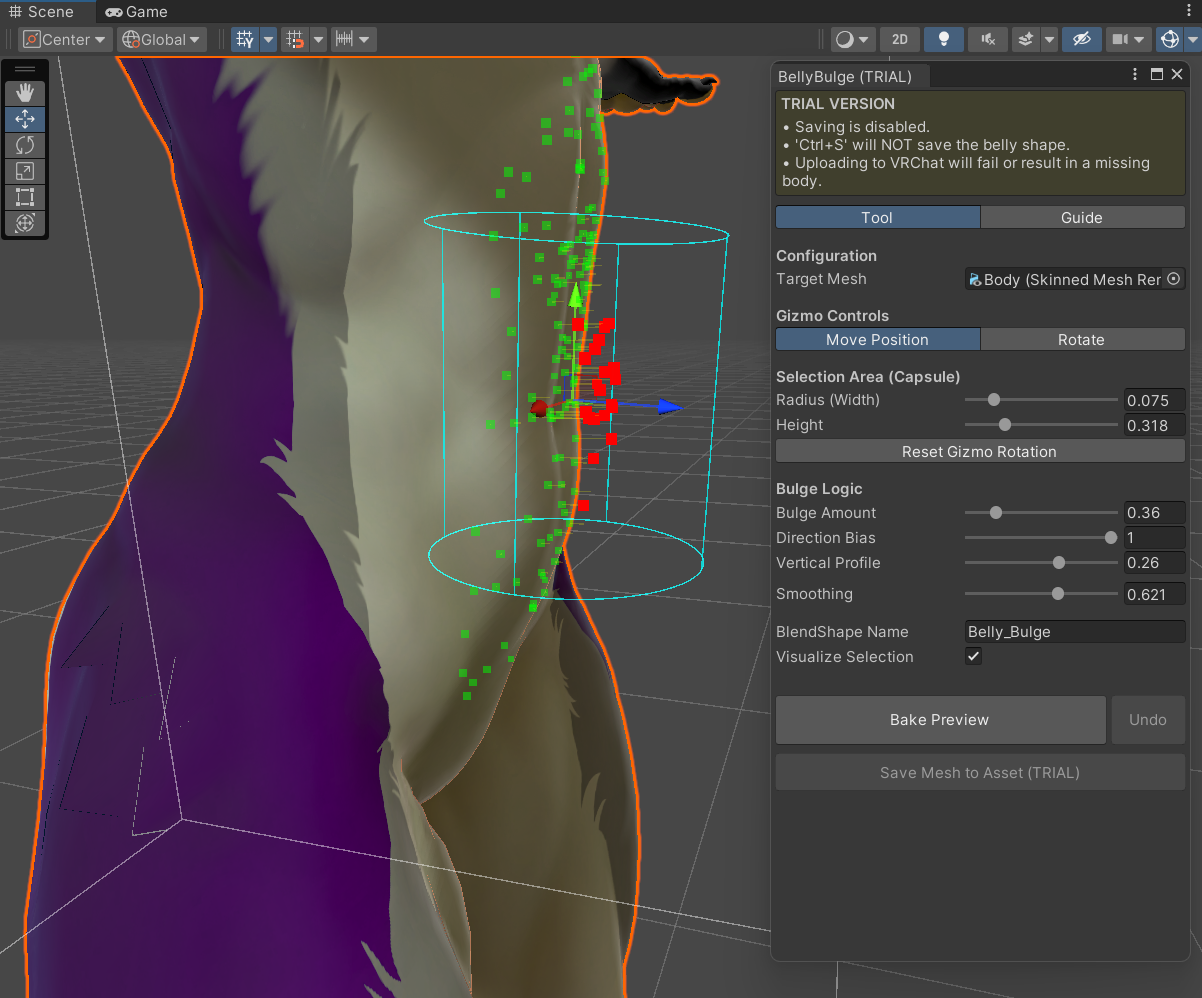
- Precision selection tool: move/rotate the selection gizmo to target exactly where you'd like to deform.
- Vertical profile control: vertical gradient slider allows you to choose where the weight sits on the body. Create anything from a low "fupa" look to a "top-heavy" full belly.
- Directional bias: pushes forward instead of outwards avoiding the "balloon" look relative to the hips.
- Predictive Visualization: get a live preview what roughly what the results will be before baking. Intuitive controls + preview make things easy. Invert-mod logic appropriately renders in preview.
- Integrated smoothing: relaxing the mesh edges reduces spikes or sharp ridges at top or bottom of the deformation.
- One-click undo & save: not what you expected? [Undo] to the rescue. Feeling satisfied? [Save] exports a new .asset file into a project folder.
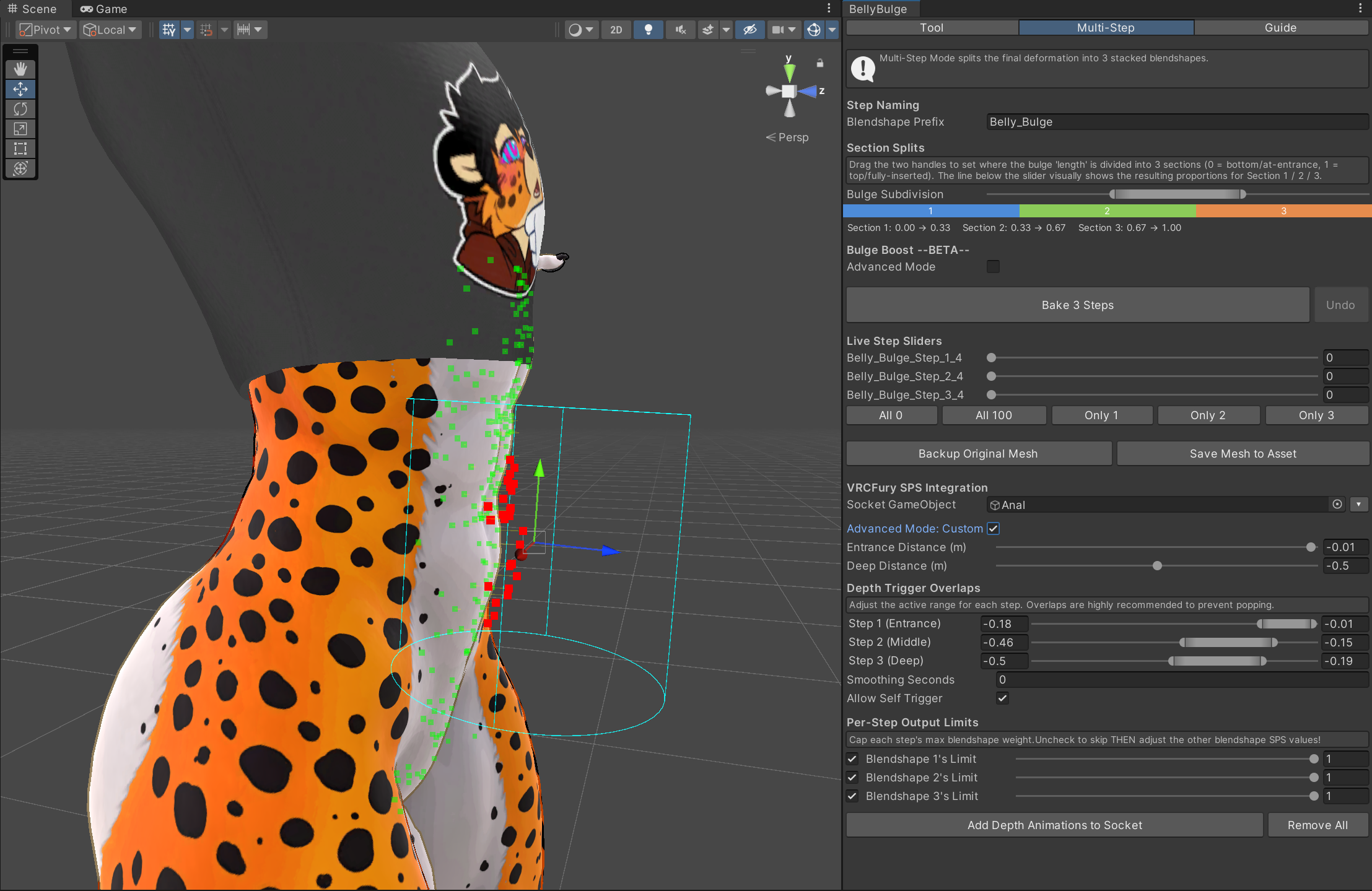
- Auto SPS Connect: after baking and saving asset if SPS sockets are setup, can automatically add animation triggers with blendshapes
- 1-step or 3-step blendshapes: either bake entire deformation in 1 blendshape or split between 3 separate and aligned blendshapes.
Technical stuff
- Save Location: Assets > timmytimYAY
- Compatibility: any Skinned Mesh Renderer (body, face, etc.).
- Quality of the full-automode depends on quality of the avatar.
- New Versions INCOMPATIBLE with old versions, meaning, if you want to upgrade for new features you will need to go back to an unaltered version of your model (so just your original prefab)
- The backup feature is for your peace of mind (and for advanced users to test with other mesh-modifying tools). The process is **non-destructive** to your original model.
Known Good (tested)
- Viwi
- Nardodragon
- Mayu
- Winterpaw Canine
- Winterpaw Feline
- Spiravali
- LiliumPanthera
- Deuzear
- Meowper
- Kita'vali L*WD MOD ONLY
- Malibu from Sturmwolf
Reported Good (user report, send me your!)
- Fennix
- SabreanV2
Fixes/Mitigations/Patches
- Novabeast and edits (avatar is weird, misaligned and with inverted axis, use the "Invert_mod" version of the tool - sorry no trial version yet as it needs more testing) Seems to be consistently misaligned along Y-axis. See novabeast screenshot for reference (note the gizmo is also has a negative rotation).
- Specific settings for the novabeast are now included on the downloads page.
- Specific settings for the Kita L*wd Mod are now included on the downloads page.
Known Potential Issues (Please get trial first)*
- Khnfu Cat (incorrect offsets)
- Kita'vali NORMAL (both original 4.8 version as well as the '2025 Modern' version).
- Mallkin-2000 Avatar Studio Builderis not supported at this time (updated 8/27/26)
- Mayu Adult patch by solocat does not work due to the many patched-in folds
- I imagine ANY use of shell texturing for faux-fur will make it look pretty funky lol
It's possible to move the deformation gizmo around to hunt for the mesh points and eyeball it but this is not consistent behavior and I've been unable to locate it for these avis. Exporting a new fbx from blender might fix the issue (but then you should just make the edit in blender lol).
If the mesh is misaligned, it is likely to be very spikey with default settings, get extreme with your bias dial and smoothing amount.
Avatars with possible issues I don't own so can't test
These are reported to be severely misaligned (similar to Novabest - see picture)
- Deira Base
- Sabreans
- Bennett
How to Use
- Tool menu under Tools > TimmyTimYAY
- Select your avatar's body mesh
- Use move and rotate modes to align selection to the correct area using preview
- Adjust Amount and Vertical Profile until the red dots look good
- Click Bake to apply. This will add a new blendshape (customizable) default: Full_Belly
- Click save to export and finalize
- In TRIAL VERSION, you will be unable to save the results
Trial Version Notes
I wouldn't want anyone to pick up the tools and for one reason or another, be unable to get satisfactory results with their avatar.
So pick this up and try it out, if you like the results, pick up a personal use license.
NOTES
If/when issues with specific avatars are resolved/mitigated I will update this page and include specific fixes/patches if necessary.
I only have experience with furry avatars, so e-boys/girls/enbys are in uncharted waters.
Hit me up on discord: timmytimyay if u have issues -- i am anxiety so pls be patient lol
CHANGES
2.0.0 (06/06/2026)
- Automatic SPS setup and integration with visual guide
- Split into Single-Blendshape (Classic) and Multi-Stage-Modes
- Configurable axis-offset mitigations
- Simple GUI for customizing bulge logic
- A VERY USEFUL STEP BY STEP GUIDE TAB IN-UNITY
- Advanced mode customizations including per-blendshape-weight and depth-triggered blendshape overlap)
- Sane defaults for most avatars
- License updated to relax terms allowing for use in commissions
Version 1.3.22 (InvertMod):
- Fixed issue with steps not being added to undo buffer
- Axis-invert options presented for broken models
TOS
1. Personal & Commercial License
- Personal Use: You may use this tool to modify your own personal avatars for platforms such as VRChat, ChilloutVR, or Resonite.
- Public Avatar Uploads: You are permitted to upload avatars using generated meshes as "Public" on social VR platforms, provided the upload complies with that platform's specific Terms of Service.
- No Mesh Distribution: You may not distribute, sell, or share the generated meshes (the
.assetfiles) as standalone files or as part of an avatar package (Unity Package, Prefab, etc.) to any third party, except as explicitly permitted under the Limited Commercial Use section below.
- Limited Commercial Use (Commissions): You may use this tool for one-off, single-avatar commissions for individual clients, provided you meet the following two requirements:
- Both Parties Must Own a Copy: Both the artist (commissioner) and the client must legitimately own a copy of the BellyBulge tool
- Mandatory In-Game Credit: You must include visible credit on the avatar's expression menu. This must be placed specifically under the SPS menu as a non-functional item readingBellyBulge by\ntimmytimyay, or by utilizing the officially provided menu icon.
2. Restrictions
- No Redistribution: You may not resell, share, or redistribute the source code, script, or editor window of this Software, in whole or in part, to any third party.
- Full vs. Trial Version: * The Full Version is licensed to a single user.
- The Trial Version is provided for evaluation purposes only. You agree not to attempt to circumvent, defeat, or modify the trial limitations
- No Obfuscation Removal: You may not decompile or reverse-engineer the software for the purpose of removing licensing checks or trial restrictions.
3. Ownership & Copyright
- TimmyTimYAY retains all ownership and copyright of the Software source code.
- The user retains ownership of any BlendShapes or Meshes generated by the tool, provided they have the legal right to modify the original base mesh.
4. Liability & Warranty
- "As-Is" Basis: The Software is provided "as-is" without warranty of any kind.
- Mesh Backups: While the tool is designed to be non-destructive, the Software is not responsible for any data loss, mesh corruption, or scene breakage. Always back up your project before performing mesh deformations.
- Third-Party Compatibility: Compatibility with future Unity versions or VRChat SDK updates is not guaranteed, though efforts will be made to maintain the tool.
5. Refund Policy
- Due to the digital nature of this product, all sales are final. No refunds will be issued once the product has been downloaded. Please use the Trial Version to ensure compatibility with your workflow before purchasing.