VRChat Macro Recorder
Product Description
VRC Macro Recorder
Record, save and replay your VRChat avatar actions.
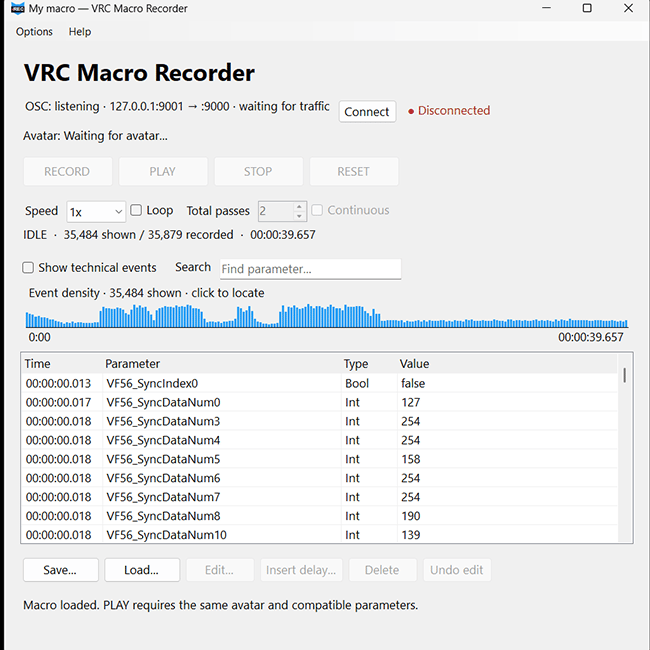
VRC Macro Recorder is a lightweight Windows tool that records avatar parameter changes sent through VRChat OSC and lets you replay them later with their original timing.
Change clothes, toggle props, trigger animations or use other controls from your avatar's Expressions Menu while recording — then play the sequence back whenever you want.
No Unity package or avatar modification is required.
demo: https://www.youtube.com/watch?v=j6EcPBCr_II
Features
- Record VRChat avatar parameter changes in real time
- Replay actions with their original timing
- Save and load
.vrcmacrofiles - Playback speed from 0.25x to 4x
- Loop macros for a fixed number of passes or continuously
- STOP automatically restores affected parameters
- RESET restores your avatar to its pre-playback state
- Edit event timing and values
- Delete events and insert delays
- Search recorded parameters
- Event timeline / density overview
- Avatar compatibility checker
- GoGo Loco / VRCFury compatibility mode
- Configurable global RECORD / PLAY / STOP hotkeys
- Stream Deck friendly through keyboard hotkeys
- Light and Dark interface
- Works in both Desktop and PC VR
- Recording and playback work completely offline
What can I use it for?
For example, you can record a sequence that:
removes a jacket → enables a prop → starts an animation → changes another avatar toggle
and replay the entire sequence later with a single PLAY command.
It can be useful for VRChat videos, performances, avatar showcases, repeated Expression Menu sequences, Stream Deck setups and other situations where you want the same avatar actions to happen again automatically.
Requirements
- Windows PC
- VRChat PC version
- VRChat OSC enabled
- An avatar exposing compatible OSC parameters
Important
VRC Macro Recorder records avatar parameter changes, not body tracking, controller movement or animation clips themselves.
Playback compatibility depends on the avatar and how its parameters are configured. Matching parameter names do not necessarily guarantee identical behavior between different avatars.
This is an independent third-party tool and is not affiliated with or endorsed by VRChat Inc.
License
Your purchase grants you a personal license to use VRC Macro Recorder on your own computers.
You may use the application while creating personal or monetized videos, streams and other content.
You may not:
- redistribute or re-upload the application
- share the downloadable files with other people
- resell the application or include it in another software package
- publish modified copies of the application
If someone else wants VRC Macro Recorder, please send them to the official Gumroad page instead.
Thank you for supporting the project!
Refund
Due to the digital nature of this product, all sales are final. Please review the product description and requirements carefully before purchasing. Refunds are not provided for compatibility issues, change of mind, or failure to meet the listed requirements. This policy does not affect any rights you may have under applicable law.