

Bolero — Cleaning Robot with Rider Set
Product Description
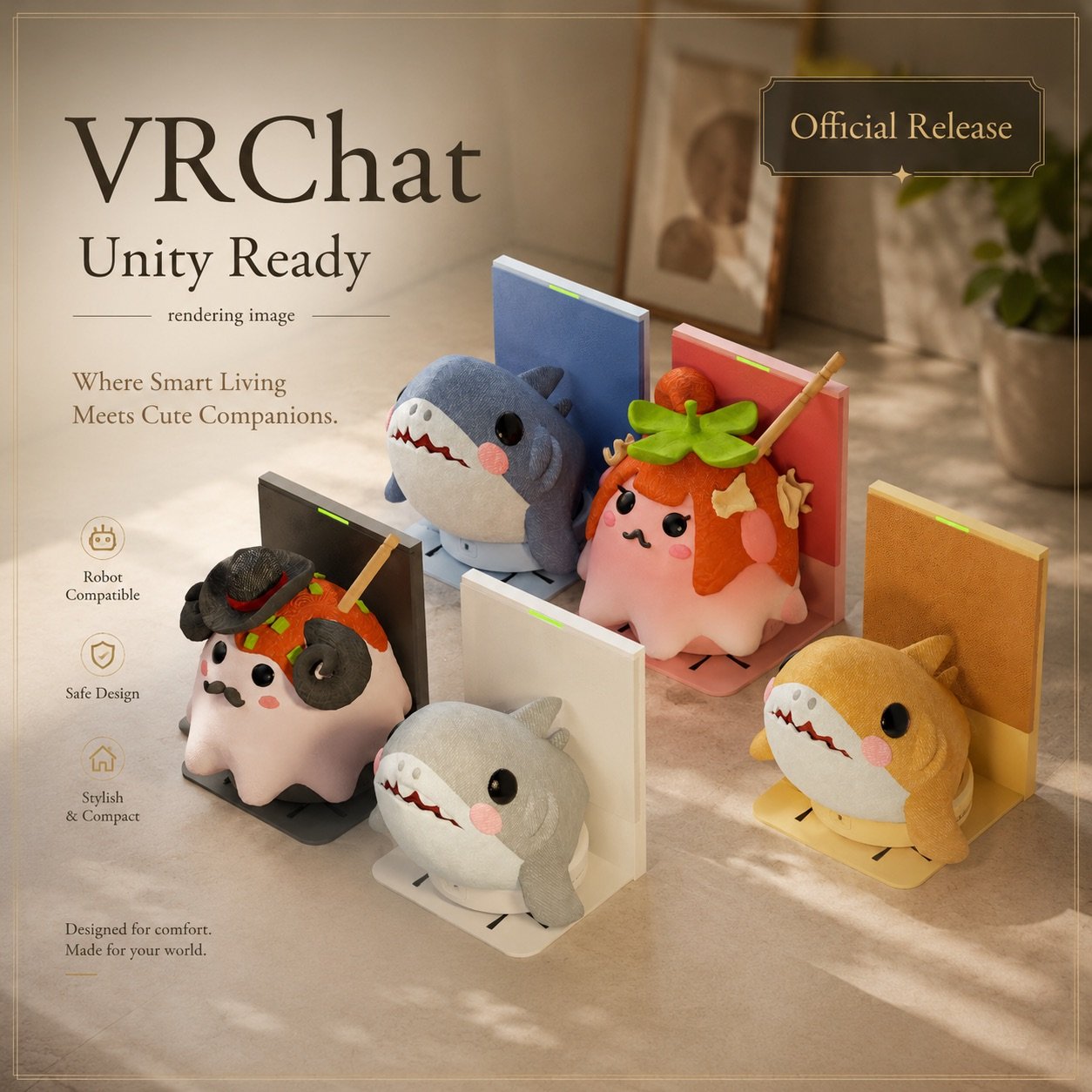
🤖 Bolero — Cleaning Robot with Rider Set — VRChat World Asset
Click the station. Watch them go.
Bolero roams your VRChat world all on its own —
but this time, it comes with a rider already on board.
The Shark Plushie cruising around on Bolero?
The Mendako-yaki dashing back to the station?
The cuteness is absolutely lethal.
You have been warned.
5 color-matched sets + 1 full collection.
Pick your favorite duo — or get them all.
─────────────────────────────
📦 WHAT'S INCLUDED
─────────────────────────────
Single Set versions:
- Bolero Robot × 1 (color matched)
- Rider × 1 (color matched)
- Charging Station × 1
All 5 Set (Full Collection):
- Bolero × 5 (Black/White/Blue/Yellow/Pink)
- Shark Plushie × 3 (Blue/Yellow/Gray)
- Mendako-yaki × 2 (Gentle/Hime)
- Boat Dish + Geta (bonus models!)
- Charging Station × 1
─────────────────────────────
🎭 SET COMBINATIONS
─────────────────────────────
💙 Blue Bolero + Blue Shark
💛 Yellow Bolero + Yellow Shark
🖤 Black Bolero + Gentle Mendako-yaki
🩷 Pink Bolero + Hime Mendako-yaki
🤍 White Bolero + Gray Shark
─────────────────────────────
⚙️ SPECS
─────────────────────────────
- Format: unitypackage
- Unity: 2022.3.x or later
- VRChat Creator Companion (VCC) required
- UdonSharp: ✅ Included
- Polygon count: Bolero 3,744 / Station 1,133 /
Shark 1,972 / Gentle 6,883 / Hime 6,983 /
Boat Dish 340 / Geta 78
- Click-to-start/return: ✅
- Obstacle avoidance: ✅
- Shader: Standard + lilToon
─────────────────────────────
🔧 SETUP
─────────────────────────────
1. Import unitypackage into your Unity project
2. Place the Prefab from "set_single" folder
into your Scene
3. Make sure the floor has a collider
4. Click the station to start Bolero!
🐙 TO SWAP RIDERS
1. Expand the bolero object in Hierarchy
2. Delete the child object under "RiderSlot"
3. Drag & drop your new rider model as a child
of "RiderSlot"
4. Adjust Position & Rotation visually
─────────────────────────────
🔊 SOUND SETTINGS
─────────────────────────────
Default volume is set low.
Adjust via BoleroMovement script Inspector:
- Start / Running / Return Complete /
Backup Beep / Idle Chirp Volume
Audio Spatial Blend: 3D (1)
Max Distance: 10 (increase for larger worlds)
─────────────────────────────
⚠️ BEFORE YOU BUY
─────────────────────────────
- Basic Unity knowledge required
- Requires Unity 2022.3.x or later
- UdonSharp required
- VRChat Creator Companion (VCC) required
- Floor collider required
- Recommended for flat floors only (no stairs)
- Do NOT place obstacles along the return
path to the charging station
- If Bolero gets stuck, click the station again
or move obstacles away
- Station has no collider — players/objects
may pass through (by design)
- Multiplayer sync not guaranteed
- ⚠️ No individual Unity support provided
─────────────────────────────
🎁 ALSO AVAILABLE SEPARATELY
─────────────────────────────
🤖 Bolero Robot (Single)
🦈 Shark Plushie Rider
🐙 Mendako-yaki Plushie Rider
─────────────────────────────
✅ TERMS OF USE
─────────────────────────────
- VRChat world use: ✅ OK
- Modification: ✅ OK
- Credit: Not required
- Commercial use: ❌ Not allowed
- Resale / redistribution: ❌ Not allowed
The creator is not responsible for any
cuteness-related incidents caused by Bolero and friends.