
Product Description
VRChat Avatar Analyzer is a creator-first Blender add-on that helps you diagnose, optimize, and ship avatars faster with confidence.
Built for real workflow speed, it combines clear performance analysis with practical one-click tools, so you spend less time guessing and more time publishing.
What It Does
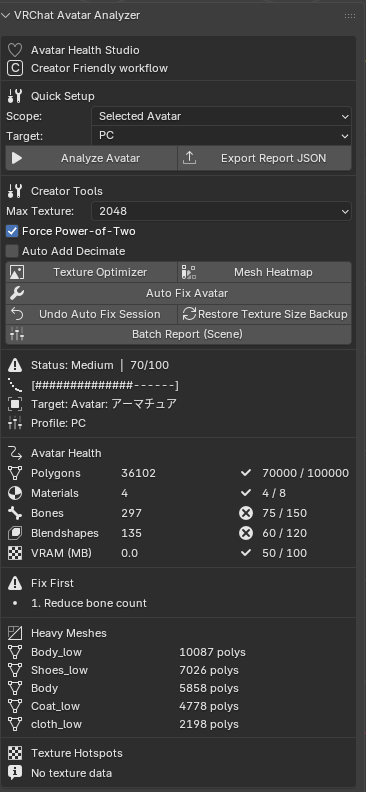
- Analyze your avatar quality with a simple score system: Good / Medium / Poor
- Track core metrics instantly:
- Polygons
- Materials
- Bones
- Blendshapes
- Estimated VRAM usage
- Show top heavy meshes and texture hotspots
- Provide prioritized optimization suggestions
Creator Tools Included
- Auto Fix Avatar with a safe, non-destructive workflow
- Mesh Heatmap to visualize heavy meshes directly in the viewport
- Texture Optimizer with resize presets and optional power-of-two scaling
- Undo Auto Fix Session
- Restore Original Texture Size from backup
- Export a single report to JSON
- Batch report multiple avatars in the scene
Update 1.2
Version 1.2 brings a smarter, safer, and more VRChat-focused optimization workflow.
New in 1.2
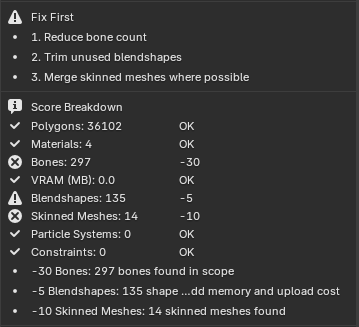
- Added VRChat-specific metrics including skinned meshes, particle systems, constraints, multi-material meshes, oversized textures, and improved blendshape evaluation
- Added a detailed score breakdown so you can clearly see what is affecting the final score and why
- Added texture ownership mapping to show which objects and materials are using each texture
- Improved Auto Fix safety with exclusion keywords for important meshes like face, hair, eyes, and other sensitive parts
- Added minimum decimate ratio control for safer non-destructive optimization
- Added texture skip keywords to avoid resizing sensitive textures such as normal maps, masks, ramps, icons, and UI assets
- Improved the panel layout with clearer VRChat-focused insights and more actionable feedback
New in 1.3
- Added a new Quest Readiness panel with Ready, Needs Work, and Not Ready status states
- Added Quest-specific fail reasons and warning breakdowns for faster troubleshooting
- Added oversized texture detection for Quest-focused review
- Added a Quest score hint for quick compatibility evaluation
- Added Apply Quest Safe Preset to instantly switch the analyzer to safer Quest-oriented settings
- Improved workflow for creators preparing avatars for both PC and Quest release targets
Quest Safe Preset includes
- Switches target profile to Quest
- Sets texture cap to 1024
- Enables power-of-two texture scaling
- Enables Auto Fix decimate workflow
- Uses a safer minimum decimate ratio
- Keeps protective skip keywords for sensitive textures
- Keeps exclusion keywords for important meshes like face, hair, eyes, and mouth parts
Why Creators Use It
- Fast feedback loops while iterating on avatars
- Cleaner optimization decisions for both PC and Quest targets
- Production-friendly panel design for daily use
- Non-destructive workflow with restore and undo options
Perfect For
- VRChat avatar creators
- Commission artists
- Team pipelines and QA passes
- Anyone preparing avatars for upload and sale
Notes
- VRAM values are estimates and may differ from runtime behavior depending on engine compression and platform settings
Requirements
- Blender 4.5+
Copyright © 2026 erutluZ.