Product Description
🦊 Fur Grooming Tool
Paint your fur maps directly onto the UV layout — right inside Unity.
Fur Grooming Tool is an editor window for authoring liltoon fur textures without leaving Unity. Comb the fur flow, paint how long it grows, and mask where it grows — then export clean, ready-to-use normal and mask textures that snap straight onto your material. No Blender round-trips, no Photoshop, no guesswork.
Four tabs, paint layers on the masks, a live 3D preview on your model, full symmetry, undo/redo, and one-click export. Everything that does work runs in the editor.
✨ Four tabs, one window
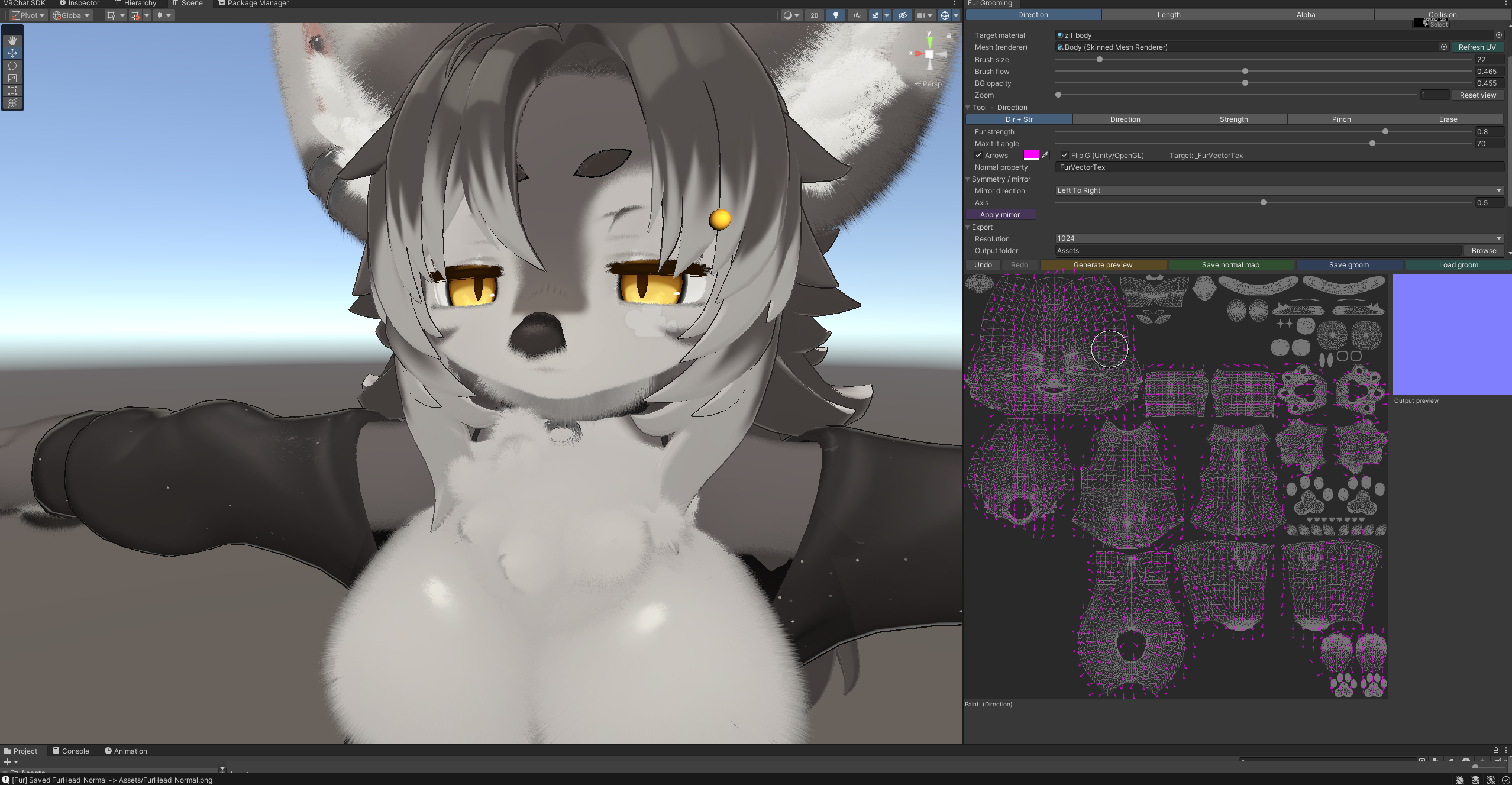
🧭 Direction — fur flow (normal map)
Drag across the UV to comb the fur. Set how strongly it lies down with the tilt strength and max-angle controls. Sub-modes let you edit exactly what you want:
Pinch — converge a tuft to a point (cowlicks, swirls)
Direction only / Strength only — tweak one channel without disturbing the other
Erase — fade strength back out
Live arrow overlay shows the flow as you paint (color-selectable)
Flip G toggle for correct Unity/OpenGL orientation
Exports a tangent-space normal map
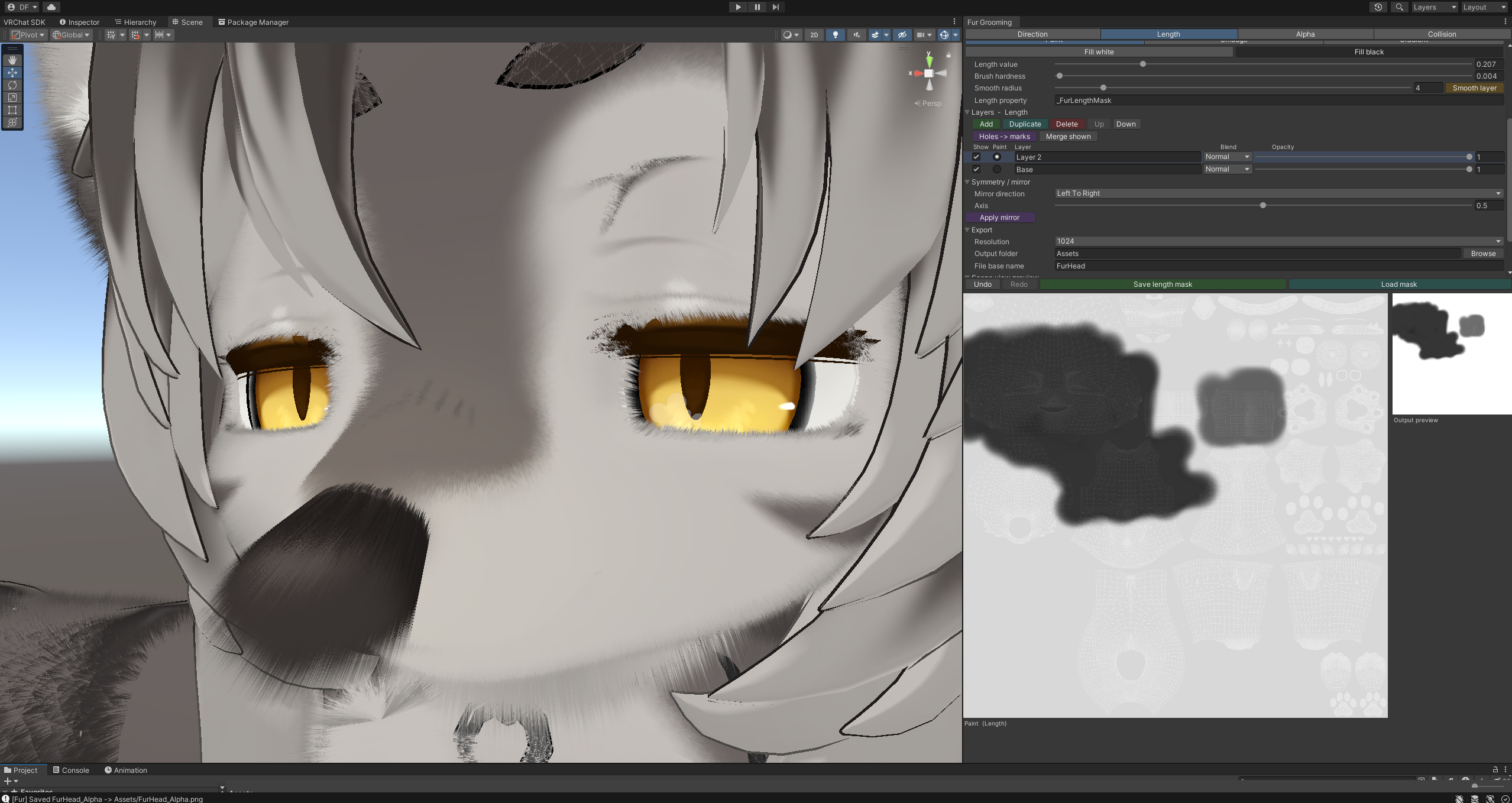
📏 Length — how long the fur grows (grayscale mask)
Built for smooth gradients, not flat fills:
Soft brush with adjustable hardness + flow build-up for natural falloff
Smudge to melt hard edges into gradients
Gradient tool — drag a line for a clean root→tip ramp
Fill white / Fill black to take a layer solid
Smooth layer — one-click blur of the layer you are painting
Right-drag lays down black to shorten; on the bottom layer it erases instead
Exports a grayscale length mask
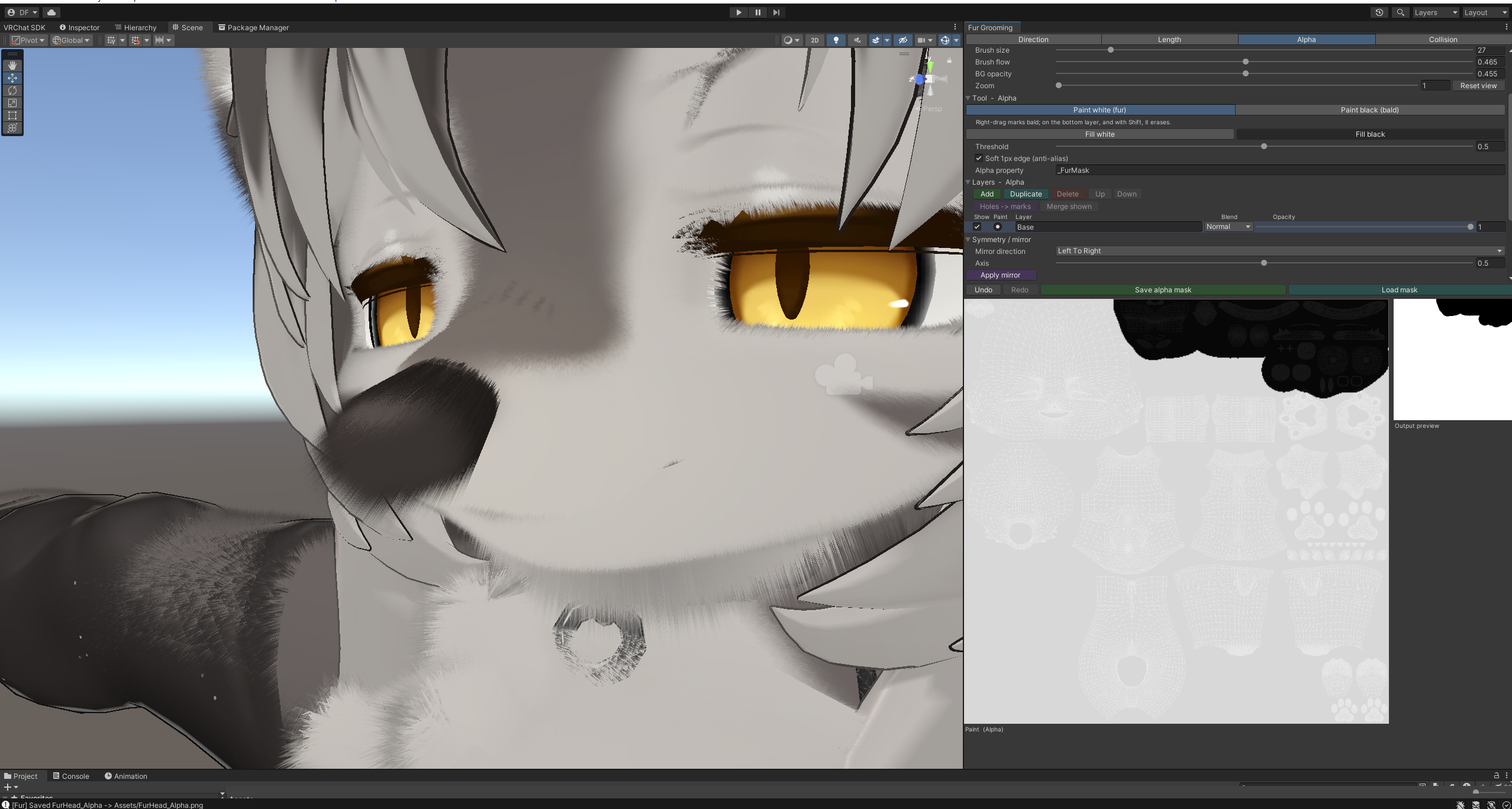
⚫ Alpha — where fur grows (presence mask)
Crisp, binary control for cutouts:
Hard white / black brushes
Fill white / Fill black for instant base coverage
Threshold + optional soft 1px anti-aliased edge
Perfect for paw pads, claws, and fur poking through clothing
Exports a crisp presence mask
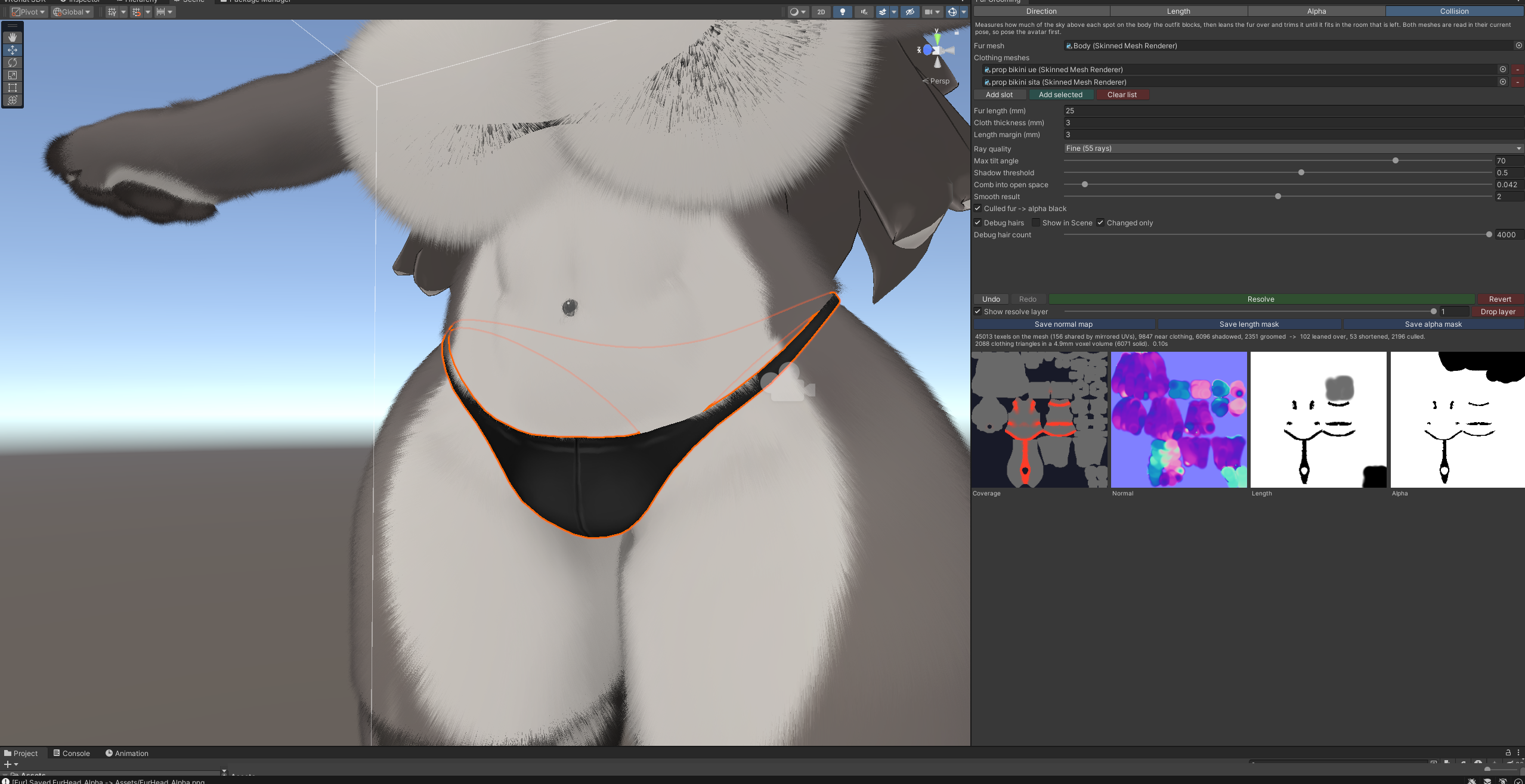
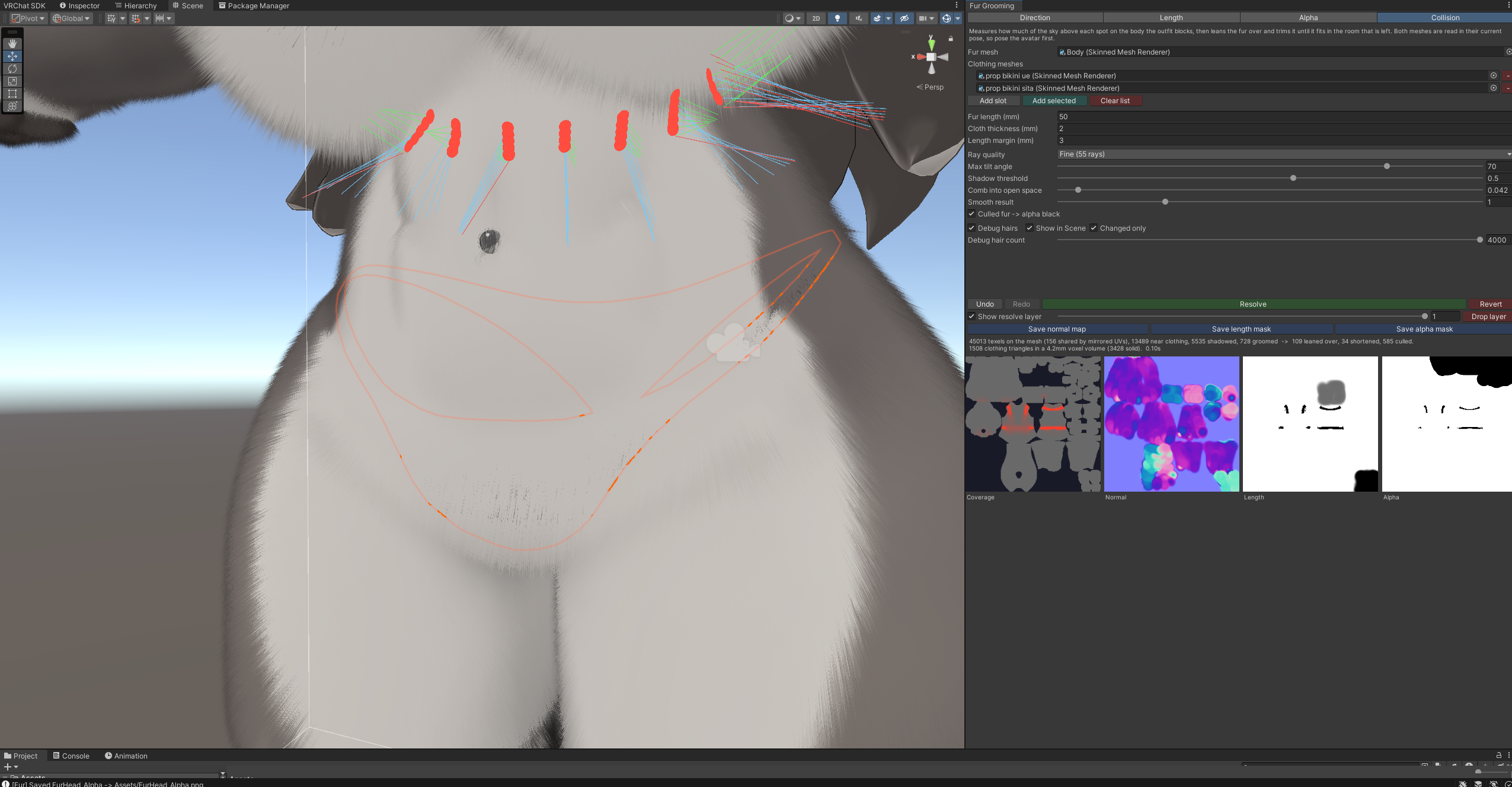
🧵 Collision — fur that fits under clothing
Point it at your outfit meshes and press Resolve. At each texel it fires a fan of rays over the hemisphere to measure how shadowed the spot is and which way there is still room, then leans the fur over far enough for the tip to fit and caps its length by the room left along the way it ends up pointing.
A 20k-triangle garment against a 256×256 direction field resolves in about 0.15 s at medium quality
The resolve writes its own layer, so it can be hidden, faded or dropped without touching the groom underneath
The coverage map is shown on the tab beside previews of the three masks it writes
Scene-view debug hairs: surface normal in green, fur as groomed in blue, fur after resolving in red
Revert, and a resolve counts as a single undo step
🧱 Paint layers on Length and Alpha
Both masks are layer stacks, the way a 2D editor does it:
Add, duplicate, delete, reorder, rename, show/hide, opacity, and a blend mode per layer (Normal / Min / Max)
Painting goes to the selected layer, so an idea can be tried and then kept or dropped without disturbing what is underneath
Merge shown flattens the shown layers exactly as the mask composites; hidden layers are kept
Holes → marks turns a layer inside out, keeping only what was erased as black marks, so stacked masks stop cancelling each other out
Export, the material preview and the resolver all read the composite, so what is saved is what is shown
Direction stays a single flat field
Groom files written by 1.0.x still load, as one base layer per mask.
👕 One bake per outfit
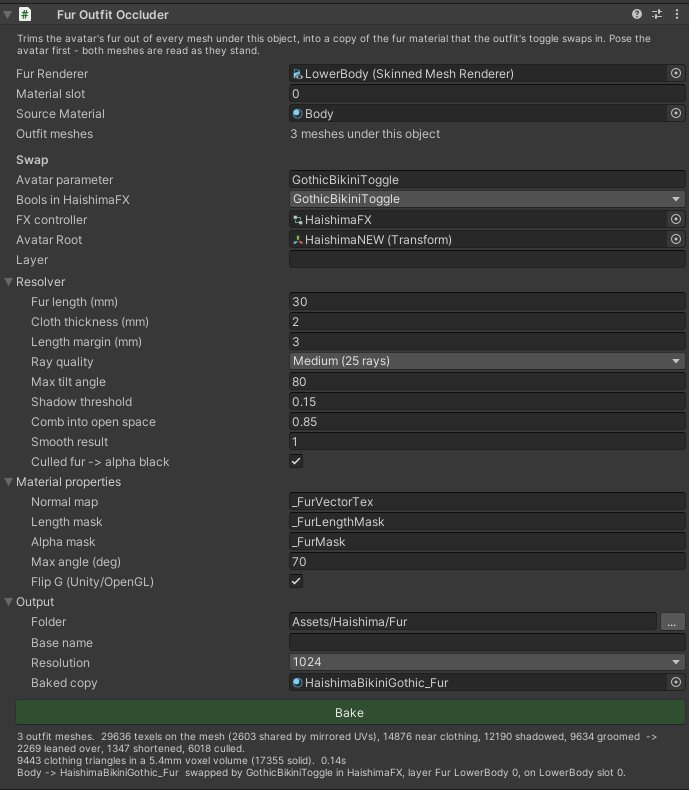
The Collision tab resolves one outfit with the paint window open. An avatar with several outfits wants that per outfit, and wants the result to arrive and leave with the toggle. Drop Fur Outfit Occluder on an outfit root and press Bake:
Collects every mesh under that root as clothing — nothing to list by hand
Reads the groom back out of the maps already on your fur material, so the paint window does not have to be open and no groom file has to sit beside the scene
Writes a fresh normal / length / alpha set and a copy of the fur material that uses them
Builds an animator layer that swaps that copy in while a bool avatar parameter is on — the same parameter your outfit toggle already uses
Your source material and its maps are never written to; each outfit gets its own copy, and re-baking after more painting picks up the new groom
The swap layer is named after the fur mesh rather than the outfit, so several outfits share one layer with a state each
🎥 See it on your model — live
Scene-view brush highlight — a marker shows exactly where your brush is on the actual 3D mesh as you paint. Symmetric/overlapping UVs light up every matching spot (e.g. both sides of the body at once).
Adjustable marker shape, color, and size.
Smoothed camera follow — the Scene camera glides to whatever you're painting, with optional align-to-surface-normal, distance/zoom, and field-of-view controls.
🪞 Symmetry that actually works
Paint one side, hit Apply mirror, done. Mirror left↔right, top↔bottom, or both, with an adjustable axis. For the direction map it correctly flips the flow vectors across the axis, so mirrored fur points the right way — not just a copied image. Mirror applies to every layer of both masks.
🗺️ Grab the UV straight from the mesh
No exporting UV snapshots from Blender. Drag your avatar's mesh in and the tool auto-generates the UV wireframe as your paint background. Uses a direct mesh reference (no material guessing), regenerates on assign, with a manual Refresh UV button. A UV map dropdown picks the channel: new meshes default to UV0, and any of UV1–UV7 the mesh has can be displayed instead, with the Scene-view marker following the same channel.
🛠️ Workflow built for real editing
Undo / redo — Ctrl+Z, Ctrl+Y (or Ctrl+Shift+Z), plus toolbar buttons. Per stroke and per operation.
Zoom & pan — cursor-anchored scroll zoom (up to 16×), middle-drag pan, zoom slider + reset. Paint fine detail on tiny islands like toes.
Set-and-forget saving — pick an output folder + base name once; saving writes straight there and overwrites silently (no file dialog every time).
Load mask — bring an existing grayscale texture back into Length or Alpha to keep editing.
Save / Load groom — store your entire editable session, the direction field and both layer stacks, and resume later.
Auto-assign — exported maps drop straight onto your material's slot on save.
Clean UI — settings grouped into collapsible sections in a scrollable panel, so the paint canvas always stays big. Color-coded action buttons.
Export resolution 512–4096, with correct import settings applied automatically (Normal map / linear grayscale, sRGB off).
🧩 liltoon-ready (and shader-agnostic)
Defaults target liltoon fur — _FurVectorTex (direction), _FurLengthMask (length), _FurMask (presence) — and the main _BumpMap normal slot. Every target property name is editable, so it works with other shaders too.
✅ Requirements & install
Unity 2019.4+
All the work happens in the editor. The outfit component carries settings and runs nothing at runtime; a bake leaves two animator states and a material swap, which is what the animation window writes when you drag a material onto a renderer slot. No performance rank hit.
Install via VRChat Creator Companion (add the listing) or import the .unitypackage directly
Works on any mesh with a UV0 map
📄 License
MIT — free to use, modify, and redistribute. Use it on personal and commercial avatars.