Material ReAssigner
Tags
Product Description
🎨 Material ReAssigner — Unity Editor Tool
By Squirtles | Free to Use
What Is This?
Material ReAssigner is a lightweight Unity Editor window that lets you swap materials on any Renderer in your scene — fast, cleanly, and without touching the Inspector. No more hunting through nested material arrays or accidentally editing the wrong slot.
Built primarily for VRChat avatar and world creators, but it works for any Unity project.
Features
- Drag-and-drop GameObject support — grab anything from your Hierarchy
- Auto-detects all Renderers — scans the object and all children (SkinnedMeshRenderer, MeshRenderer, etc.)
- Visual slot picker — see every material slot listed by name, click to select
- Drag-in replacement — drop a material from your Project window directly onto the replacement zone
- Full Undo support — Ctrl/Cmd+Z works after every apply
- Scene-safe — marks objects dirty so Unity saves correctly
How to Install
- Download
MaterialReAssigner.cs - Place it inside any
Editorfolder in your Unity project - Example path:
Assets/Squirtles/Editor/MaterialReAssigner.cs
- Example path:
- Unity will compile it automatically — no packages or dependencies required
⚠️ The script MUST be inside a folder named
Editoror Unity won't recognize it as an editor tool.
How to Use
Open the tool from the menu bar:
Squirtles → VRC Tools → Material ReAssigner
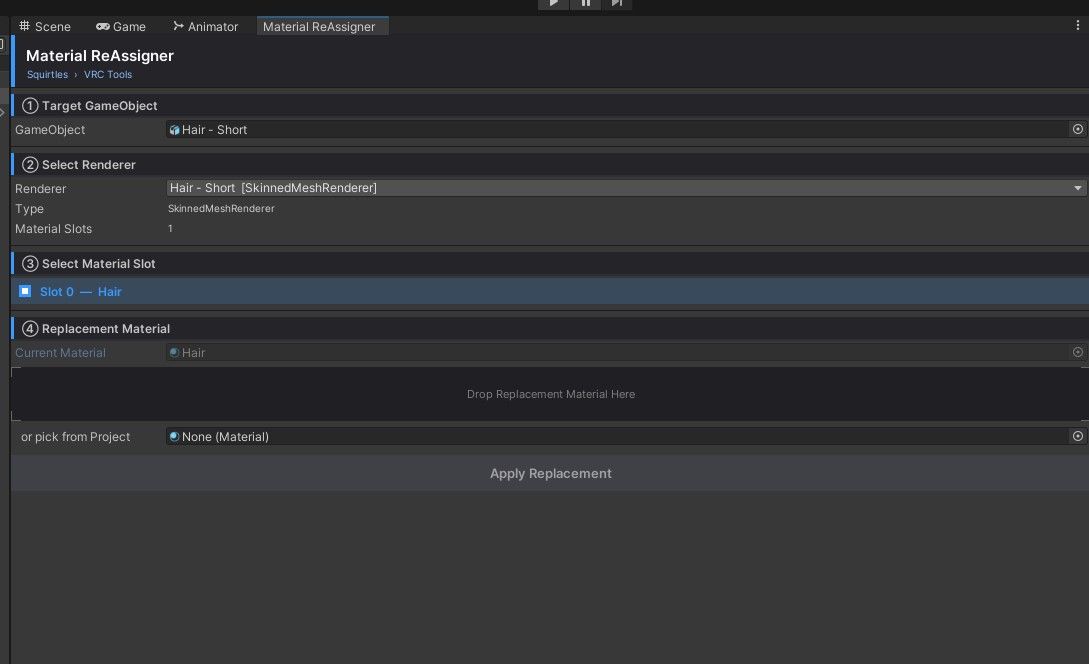
Then follow the four steps in the window:
StepWhat to Do
① Target GameObject
Drag a GameObject from your Hierarchy into the field
② Select Renderer
Pick which Renderer component to target from the dropdown
③ Select Material Slot
Click the slot you want to replace
④ Replacement Material
Drag a material onto the drop zone, then hit Apply
That's it! The material swaps instantly and the change is undoable.
Requirements
- Unity 2019.4 or later (tested on 2022.3 LTS)
- Works with VRChat SDK2 and SDK3 (Avatars & Worlds)
- No extra packages needed
License & Usage
Free to use. Personal and commercial projects welcome.
- ✅ Use in personal VRChat avatars & worlds
- ✅ Use in commercial Unity projects
- ✅ Include in prefab packages you sell or share
- ❌ Please don't reupload this tool and claim it as your own
- ❌ Don't sell this script standalone
If you share something cool you made using it, feel free to tag me — I'd love to see it!
Support
Found a bug or have a feature request? Leave a comment on the listing or reach out directly.
If this saved you time, a ⭐ rating on the listing goes a long way — thank you! 💙
Made with love by Squirtles