
Product Description
🚀 ADVANCED Fast Teleport 2.2 – Advanced Teleportation System for VRChat
Build fast, polished, and highly configurable teleport networks for your VRChat worlds.
ADVANCED Fast Teleport 2.2 combines a centralized teleport Core, professional editor tools, customizable screen transitions, per-door loading screens, configurable gizmos, audio, destination searching, and multiple teleport methods into one optimized UdonSharp system.
Whether you are building a nightclub, social world, hotel, large city, game map, VIP area, lobby, or multi-floor environment, Advanced Fast Teleport is designed to make teleport setup fast for creators and smooth for players.
✅ Easy to configure – Drag the prefabs into your scene and use the custom inspectors.
✅ Centralized system – One Core manages teleport execution, FX, audio, overlays, timing, and runtime protection.
✅ Professional scene workflow – Search tools, destination lists, gizmos, validation, and automatic references.
✅ Custom loading screens – Assign unique images to individual doors with Random or Sequential playback.
✅ Advanced transitions – Fade, zoom, fullscreen image overrides, loading indicators, and more.
✅ VRChat optimized – Built with UdonSharp and designed for lightweight runtime operation.
⭐ What’s New in Version 2.2
Version 2.2 significantly expands the visual, editor, and loading-screen capabilities of Advanced Fast Teleport.
🖼️ Per-Door Loading Screen Images
Teleport doors can now temporarily replace the default Core overlay with their own images.
Each door can contain a list of custom textures.
For every image you can independently configure:
- Texture Image
- Fullscreen
- Show Loading
The selected image is automatically applied to the Screen Space Overlay during that teleport and the default Core image can be restored afterward.
Image Sequence
Each door supports two image selection modes:
- Random
- Selects a random valid image every time the door is used.
- Sequential
- Moves through the image list in order.
- Empty texture slots are automatically skipped.
- When the last valid image is reached, the sequence loops back to the beginning.
🖥️ True Fullscreen Overlay Mode
Each door image has an independent Fullscreen toggle.
When enabled, the shader uses a dedicated fullscreen rendering path.
This means the system ignores normal image scaling controls such as:
Image Global Scale- original image aspect ratio
- normal overlay framing
The image is deliberately stretched across the complete screen.
A square, portrait, or landscape texture can therefore be forced to completely fill the player's view.
This is especially useful for:
- loading screens
- cinematic teleport transitions
- location artwork
- branded world transitions
⏳ Advanced Shader-Based Loading Indicator
Loading graphics are no longer required to be baked into the image.
Version 2.2 includes a shader-generated loading indicator.
Each individual door image has:
Show Loading – ON / OFF
It is disabled by default.
When enabled, the shader displays:
LOADING
with an animated row of loading squares underneath.
The loading interface maintains its proportions even if the background image is stretched in Fullscreen mode.
The squares remain visually square instead of becoming stretched rectangles.
⚙️ Loading Indicator Customization
The included shader editor provides detailed controls for the loading interface.
You can configure:
- Screen Position X
- Screen Position Y
- Global Scale
- Letter Spacing
- Text / Squares Gap
- Square Size
- Square Spacing
- Square Count
- Loading Speed
- text appearance
- square appearance
- panel appearance
- loading animation behavior
Square Count uses an integer value, making the number of loading blocks predictable and easy to configure.
⏱️ Loading Progress Modes
The loading animation supports multiple timing behaviors.
Loop by Speed
The loading squares animate continuously using the configured:
Loading Speed
This works like a traditional looping loading indicator.
Match Teleport Time
The loading animation can also follow the actual teleport sequence.
The Core calculates progress using the complete teleport duration:
Fade In + Waiting Time + Fade Out
The loading indicator progresses together with the teleport and reaches completion near the end of the transition.
This makes the loading animation feel connected to the actual teleport rather than being a completely independent visual effect.
🎨 Custom Screen Space Overlay Shader
Advanced Fast Teleport 2.2 includes its own dedicated overlay shader:
ParrotsConch/SSO_FastTPA
Located at:
Assets/ParrotsConch/Shaders/SSO_FastTPA/
The shader supports:
- Background Color
- Background Opacity
- Overlay Texture
- Image Opacity
- Image Global Scale
- Fullscreen Override
- CrossFade control
- animated loading indicator
- loading positioning
- loading scaling
- loading spacing
- loading square configuration
- loading animation speed
- teleport-time synchronized progress
🎛️ Professional Shader Editor
The Screen Space Overlay shader includes its own custom inspector designed to visually match the Advanced Fast Teleport editor.
The shader parameters are organized into professional foldable sections instead of exposing a raw Unity material inspector.
Sections include controls for:
- Screen Overlay
- Overlay Image
- Loading Settings
- Runtime / Preview
The shader editor also includes convenient preview controls so you can test effects directly from the material inspector.
✨ Advanced Crossfade Methods
Teleport doors are no longer limited to a simple fade.
Each door can select its own transition method.
Available methods include:
- Fade Only
- Zoom In
- Zoom Out
- Fade + Zoom In
- Fade + Zoom Out
- Zoom Pulse
Zoom-based transitions also include an adjustable:
Overlay Zoom Strength
The Core controls the shader directly during runtime, so the transition does not depend exclusively on Animator material animation.
🧠 Core-Based Teleport Architecture
Advanced Fast Teleport uses a centralized controller:
FastTP_Core
Instead of every door independently handling teleport logic, every door sends a request to the Core.
The Core manages:
- teleport execution
- fade transitions
- screen overlays
- custom door images
- loading indicators
- audio
- movement freezing
- Post Process protection
- teleport timing
- fullscreen image overrides
- zoom transitions
- request protection
Doors remain lightweight configuration objects.
This architecture provides:
- better stability
- consistent teleport behavior
- less duplicated runtime logic
- simpler debugging
- centralized configuration
- anti-spam protection
While a teleport is already running, additional requests are ignored until the current sequence is complete.
🧠 Teleport Sequence
When Teleport FX is enabled, the Core executes the complete sequence.
1. Prepare Teleport
If enabled:
- player velocity is cleared
- player movement is frozen
- detected Post Process volumes are temporarily disabled
2. Fade In
The Screen Space Overlay gradually appears.
If the door uses a custom image, the selected image is applied before the transition.
Optional effects such as zoom and loading animation are processed at the same time.
3. Waiting Period
After Fade In completes, the system enters the configured waiting period.
At approximately half of the waiting time, the player is teleported.
4. Fade Out
The overlay gradually disappears.
5. Restore Runtime State
After the entire transition finishes:
- the default overlay can be restored
- Post Process objects return to their previous state
- player movement is unlocked
- the Core becomes available for the next teleport
🧊 Freeze Player Movement
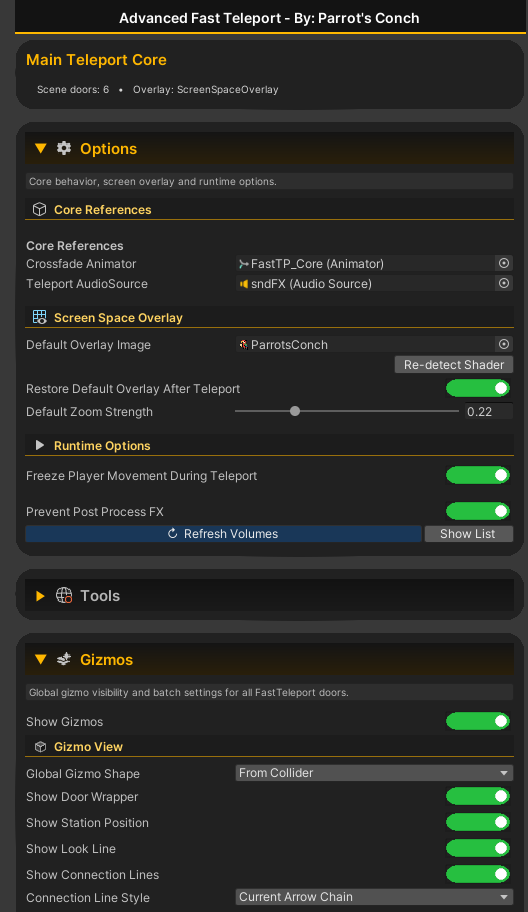
The Core includes:
Freeze Player Movement During Teleport
When enabled, the local player is immobilized for the complete transition.
The system also clears player velocity to prevent momentum from carrying the player through the destination.
VR head movement remains naturally available.
🎥 Prevent Post Process FX
Post-processing effects can sometimes create visual trails or unwanted artifacts during teleportation.
The Core includes:
Prevent Post Process FX
When enabled:
- the system stores the current state of detected Post Process objects;
- disables them before the teleport transition;
- performs the teleport;
- restores their previous states after the transition has completely finished.
The Core inspector also provides tools for refreshing and inspecting the cached Post Process objects.
🚪 Teleport Modes
Every FastTeleport door can independently use one of three modes.
Receiver Only
The door acts only as a destination.
It cannot initiate a teleport.
Its collider is automatically disabled.
Perfect for:
- invisible arrival points
- one-way teleport destinations
- dedicated receiver locations
By Clicking
The door uses VRChat's normal interaction system.
Players look at the object and interact with it to teleport.
The collider remains enabled and operates as a normal interaction collider.
By Trigger
Players teleport automatically when entering the trigger.
The collider is configured as a Trigger.
The VRChat interaction outline is automatically disabled in this mode, so Trigger doors do not incorrectly appear as clickable interactable objects.
🔎 Advanced Destination Search
Teleport Settings includes a dedicated door search system.
Instead of manually searching large scene hierarchies, simply enter part of a door's name and press:
Search & Set
The editor finds the first matching FastTeleport door and automatically assigns its Receive Station as the current destination.
The interface also provides:
- Search & Set
- Refresh List
- Focus
These tools use individually colored buttons and editor icons for faster scene navigation.
The Focus button is positioned directly next to the Destination Door selector.
🎯 Destination Door Selector
Every sending door can select another FastTeleport door using a simple dropdown.
The system works using the destination door's:
Receive Station
This keeps scene setup understandable:
Gate A → Gate B
Gate B → Gate A
Door names are used throughout the editor and gizmo system to make larger networks easier to understand.
🎨 Advanced Gizmo System
Version 2.2 introduces a much more powerful gizmo system.
There are two levels of control:
Core Gizmos
The Core controls the global appearance and visibility of the teleport network.
Individual Door Gizmos
Every door also contains its own independent gizmo configuration.
This means you can configure all doors globally and still customize individual doors when necessary.
🌐 Global Gizmo Controls
The Core includes:
Show Gizmos
Master switch for the complete teleport network.
Additional controls include:
- Show Door Wrapper
- Show Station Position
- Show Look Line
- Show Connection Lines
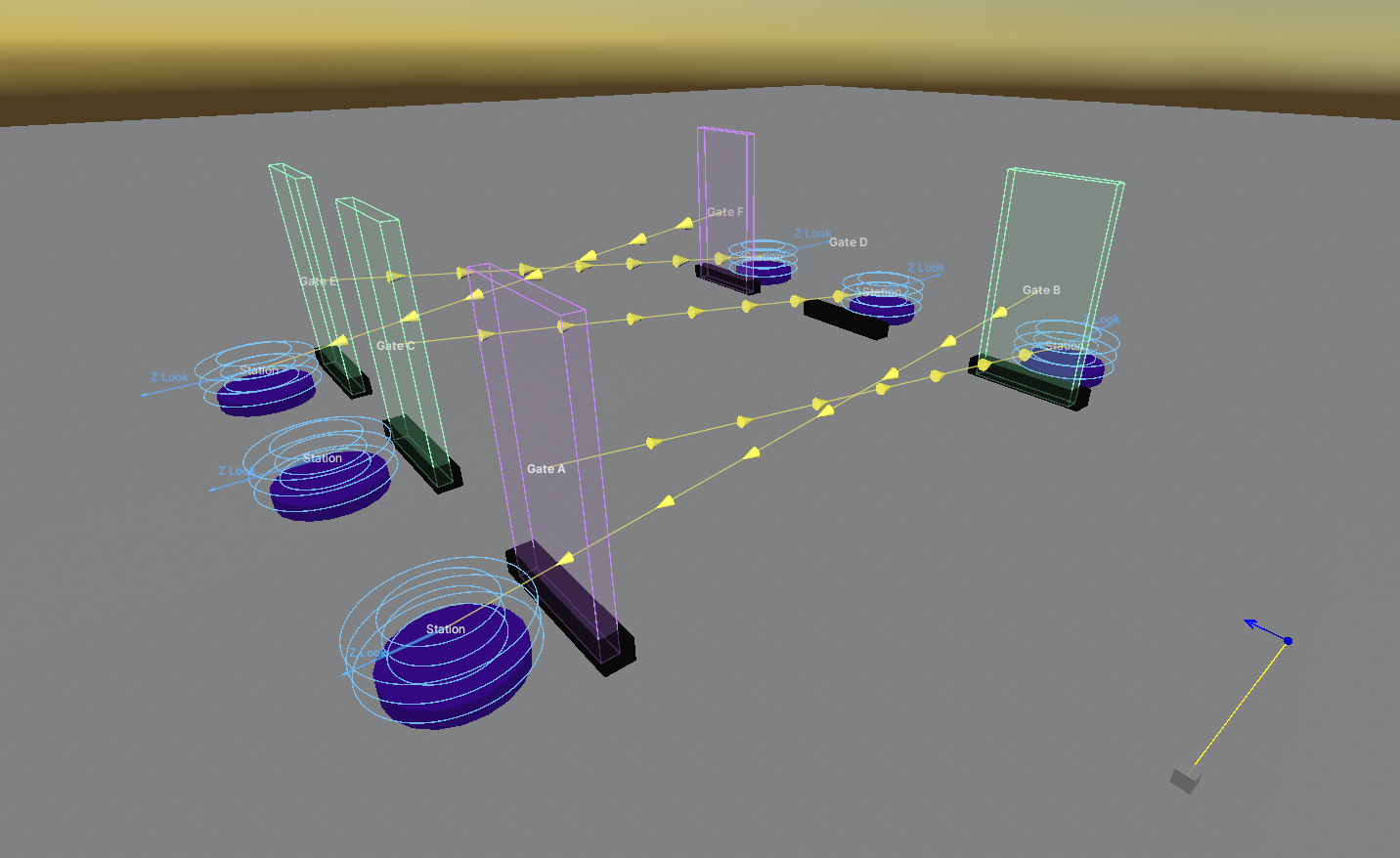
➡️ Station Look Direction
Receive Stations can display a blue directional arrow representing their local Z axis.
This makes it much easier to understand exactly which direction the player will face after arriving.
🔗 Connection Line Styles
Teleport connections can be visualized using different styles.
Available connection styles include:
- Simple Line
- Simple Arrow
- Arrow Chain
- Dotted Line
This makes large teleport networks significantly easier to debug visually.
🔷 Gizmo Shapes
Door wrappers can also use different visualization styles.
Available gizmo shapes include:
- From Collider
- Box
- Sphere
- Bounds
Individual doors can override these settings while still respecting the Core's global visibility controls.
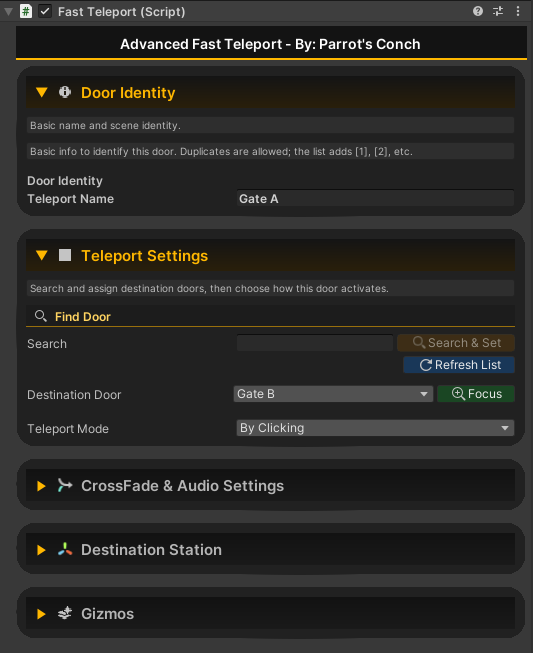
🛠️ FastTeleport Door Inspector
Each teleport door uses a custom professional inspector.
Main sections include:
🚪 Door Identity
Configure the friendly name of the teleport.
This name is used by:
- destination lists
- search tools
- gizmos
- editor utilities
⚡ Teleport Settings
Configure:
- Destination Door
- Search & Set
- Refresh List
- Focus
- Teleport Mode
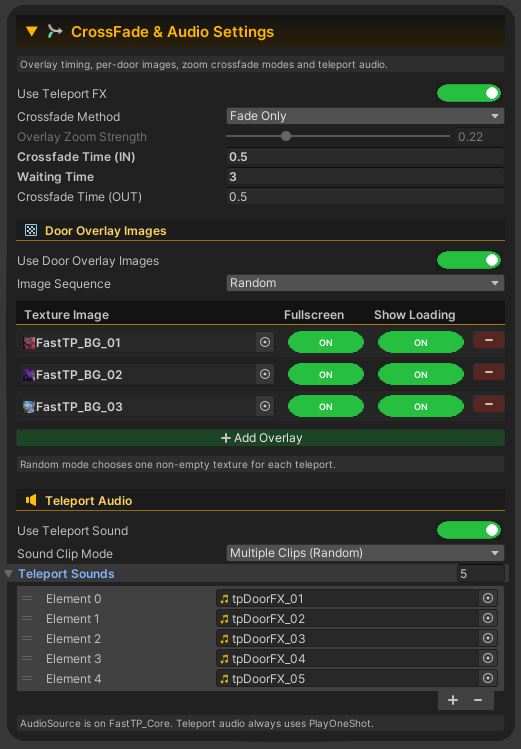
🎬 CrossFade & Audio Settings
Configure:
- Use Teleport FX
- Crossfade Method
- Overlay Zoom Strength
- Fade In Time
- Waiting Time
- Fade Out Time
- Door Overlay Images
- Image Sequence
- Fullscreen per image
- Show Loading per image
- teleport audio
📍 Destination Station
Configure the door's:
Receive Station
This determines where players appear when another door targets this one.
🧭 Gizmos
Configure this specific door's scene visualization.
These settings affect only the selected door while the Core continues to provide global control.
🎵 Teleport Audio
Every door can optionally play a teleport sound.
Supported audio configurations include:
Single Clip
Use one specific AudioClip.
Multiple Clips
Provide multiple clips and let the system select one randomly.
All teleport audio is played through the AudioSource located on:
FastTP_Core
Audio playback always uses:
PlayOneShot
This keeps sound playback predictable and avoids replacing the AudioSource's assigned clip during runtime.
🧰 FastTeleportCore Inspector
The Core acts as the control center of Advanced Fast Teleport.
Its custom editor includes sections for:
- Core references
- Screen Space Overlay
- Runtime Options
- Tools
- Gizmos
- Requested Parameters
🖼️ Screen Space Overlay Configuration
The Core automatically detects the child:
ScreenSpaceOverlay
and internally obtains its MeshRenderer and material.
When correctly detected, unnecessary internal references remain hidden from the normal inspector.
If the reference cannot be found, repair tools become available.
The Core supports:
- Default Overlay Image
- automatic shader property detection
- restoring the default overlay after teleport
- default zoom strength
- custom door overlay replacement
Changing the default image in the editor also updates the overlay material automatically.
🛠️ Core Tools
The Core includes scene-management utilities such as:
Validate Scene
Checks the Fast Teleport network for common configuration problems.
Examples include:
- no teleport doors found
- only one teleport door
- missing Core references
- missing Receive Stations
- invalid configuration
AutoFix
Automatically assigns the correct Core reference to FastTeleport doors when possible.
📊 Requested Parameters
The Core also contains a runtime debugging section showing information about the active or most recent teleport request.
This can include:
- source door
- destination
- teleport mode
- fade times
- waiting time
- crossfade method
- selected overlay
- fullscreen state
- loading state
- sound configuration
- selected AudioClip
- transport state
This is useful when testing more complex teleport networks.
📦 What’s Included in Version 2.2
✅ FastTP_Core centralized teleport controller
✅ FastTeleport Door system
✅ Custom FastTeleport inspector
✅ Custom FastTeleportCore inspector
✅ Dedicated Screen Space Overlay shader
✅ Custom shader editor
✅ Per-door loading-screen images
✅ Random and Sequential image selection
✅ Per-image Fullscreen option
✅ Per-image Show Loading option
✅ Shader-generated loading indicator
✅ Teleport-time synchronized loading progress
✅ Multiple crossfade and zoom methods
✅ Global and individual gizmo configuration
✅ Multiple gizmo shapes
✅ Multiple connection-line styles
✅ Destination search system
✅ Search & Set workflow
✅ Scene validation and AutoFix tools
✅ Movement freeze
✅ Post Process protection
✅ Single or random teleport sounds
✅ PlayOneShot audio playback
✅ Trigger teleport without VRChat interaction outline
✅ SimpleTP lightweight teleport alternative
✅ Three example 16:9 Parrot's Conch loading backgrounds
🖼️ Example Loading Backgrounds
Version 2.2 includes sample fullscreen images located at:
Assets/ParrotsConch/Textures/FastTp/
Including:
FastTP_BG_01FastTP_BG_02FastTP_BG_03
These can be used directly or replaced with your own artwork.
📁 Main Paths
Scripts
Assets/ParrotsConch/Scripts/FastTeleport/
Shader
Assets/ParrotsConch/Shaders/SSO_FastTPA/
Example Textures
Assets/ParrotsConch/Textures/FastTp/
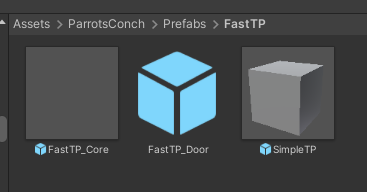
Prefabs
Assets/ParrotsConch/Prefabs/FastTP/
⚡ Bonus Included: SimpleTP
For creators who do not need the Advanced Fast Teleport Core, the package also includes:
SimpleTP
A minimal instant teleport solution.
It does not require:
- Core
- screen transitions
- loading images
- audio
- advanced configuration
Simply assign a target and teleport.
Ideal for:
- prototypes
- utility teleporters
- admin shortcuts
- hidden portals
- simple worlds
- performance-focused setups
🎮 Quick Setup Guide – Version 2.2
- Navigate to:
Assets/ParrotsConch/Prefabs/FastTP/ - Drag FastTP_Core into the scene.
- Keep the Core GameObject named:
FastTP_Core - Add your first FastTeleport Door.
- Adjust its Collider to match the teleport area.
- Configure its Receive Station.
- Give the door a recognizable name, such as:
Lobby - Duplicate it and place another door elsewhere, for example:
Rooftop - Open Teleport Settings.
- Select the destination from the list or use:
Search & Set
- Configure the desired Teleport Mode:
- Receiver Only
- By Clicking
- By Trigger
- Optionally configure:
- Fade In / Wait / Fade Out
- transition method
- zoom strength
- custom loading images
- Random / Sequential image sequence
- Fullscreen
- Show Loading
- teleport audio
- movement freezing
- Post Process prevention
- Repeat for the other door.
Example:
Lobby → Rooftop
Rooftop → Lobby
✅ Your Advanced Fast Teleport network is ready.
🌴 Built for Large and Polished VRChat Worlds
Advanced Fast Teleport 2.2 is especially useful for:
- social worlds
- nightclubs
- hotels
- resorts
- cities
- large exploration maps
- multi-floor buildings
- VIP areas
- roleplay worlds
- game arenas
- event worlds
- private rooms
- portals and travel networks
Create complex teleport systems while keeping the scene organized, understandable, and easy to maintain.
🚀 ADVANCED Fast Teleport 2.2
Fast setup. Smooth transitions. Powerful customization. One centralized teleport system.
Give every teleport in your VRChat world a more polished and professional presentation with Advanced Fast Teleport 2.2 – By Parrot's Conch.
AI-Assisted Content Disclosure
Part of the development of this product was assisted by AI.
AI tools were used during portions of the development process, all files included in the final product were reviewed, edited, configured, tested, and packaged by Parrot's Conch.
No third-party copyrighted characters, registered logos, branding elements, or personal images were intentionally included in the final distributed product.