
Cosmic Robe — Auto-Fit Hooded Robe for VRChat
Product Description
This product contains AI-generated content.
▶ VRChat avatar outfit · PC only · needs Modular Avatar (free, from VCC) · drag-and-drop prefab
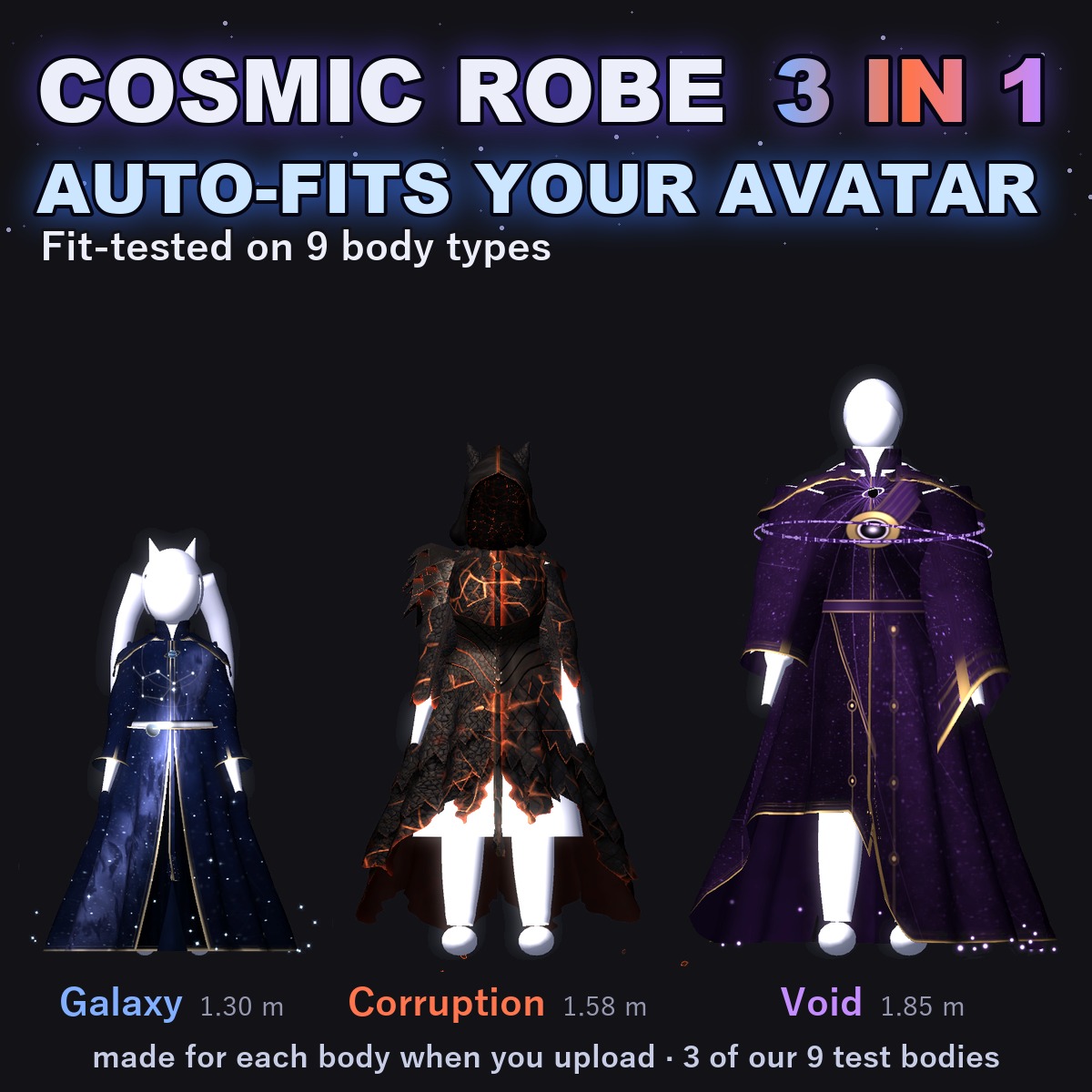
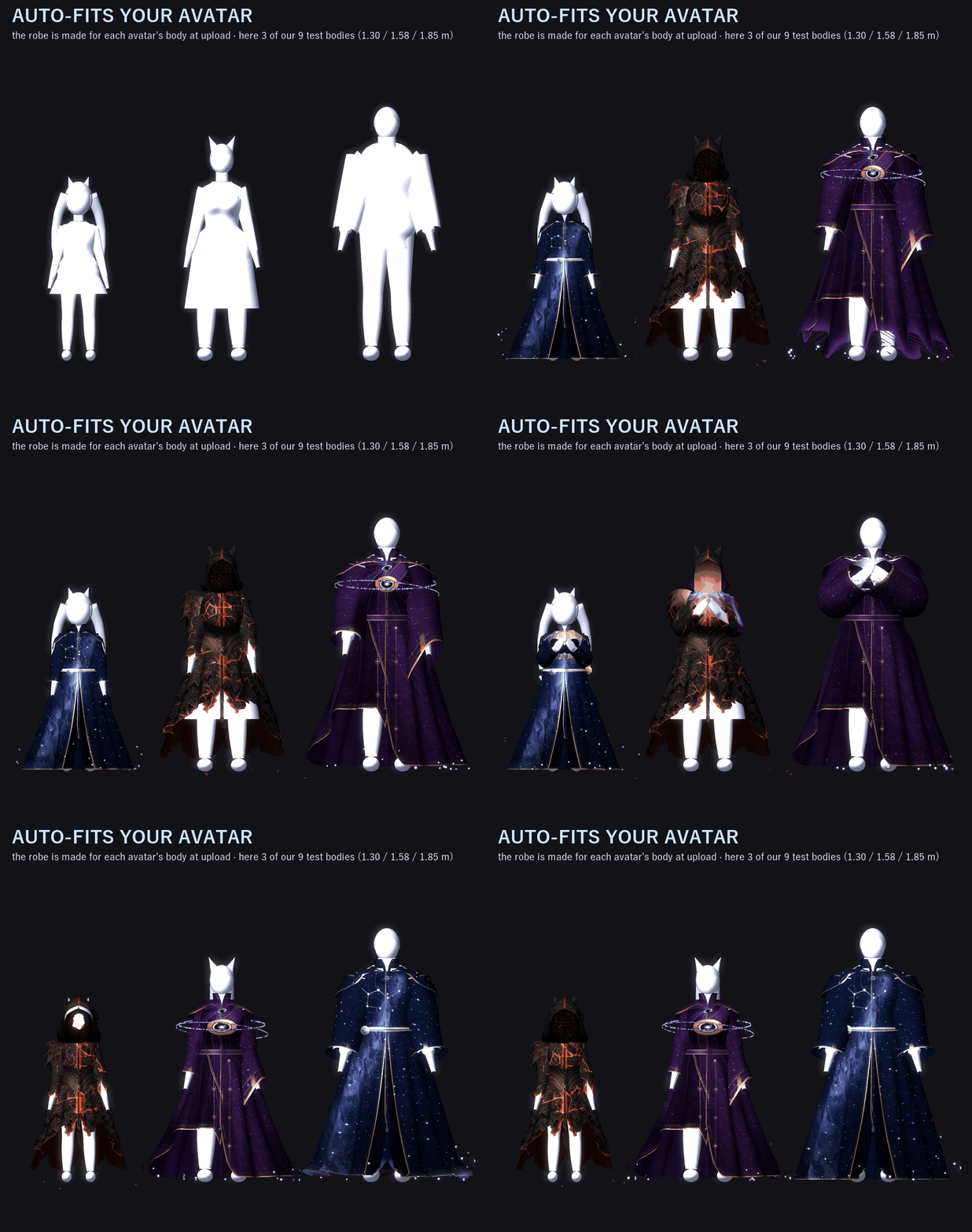
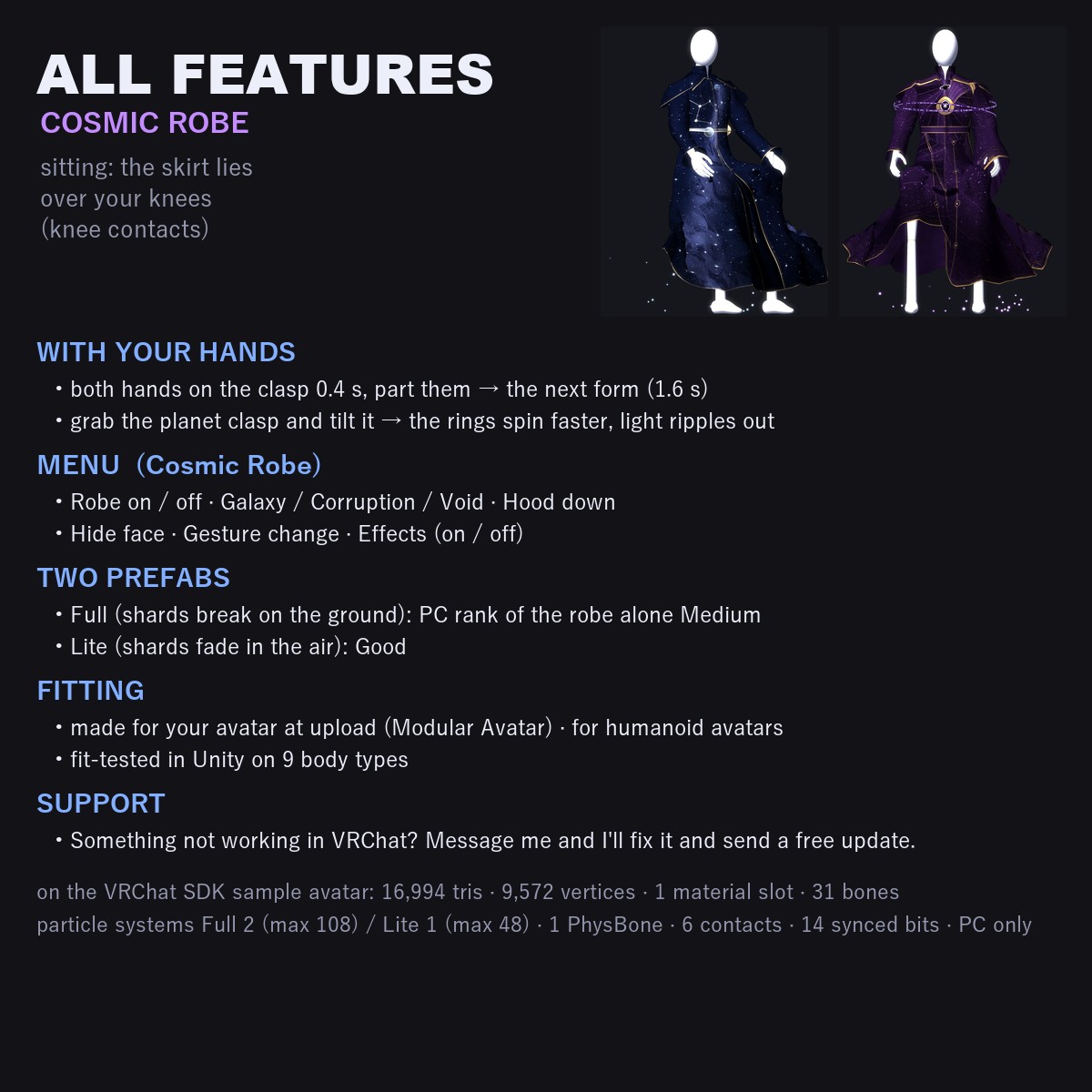
Made for your own avatar's body: in Unity the robe mesh is built for the avatar you put it on, at upload (Modular Avatar / NDMF), or press "Fit to this avatar" in the Inspector to see it first. For humanoid avatars. Fit-tested in Unity on 9 body types.
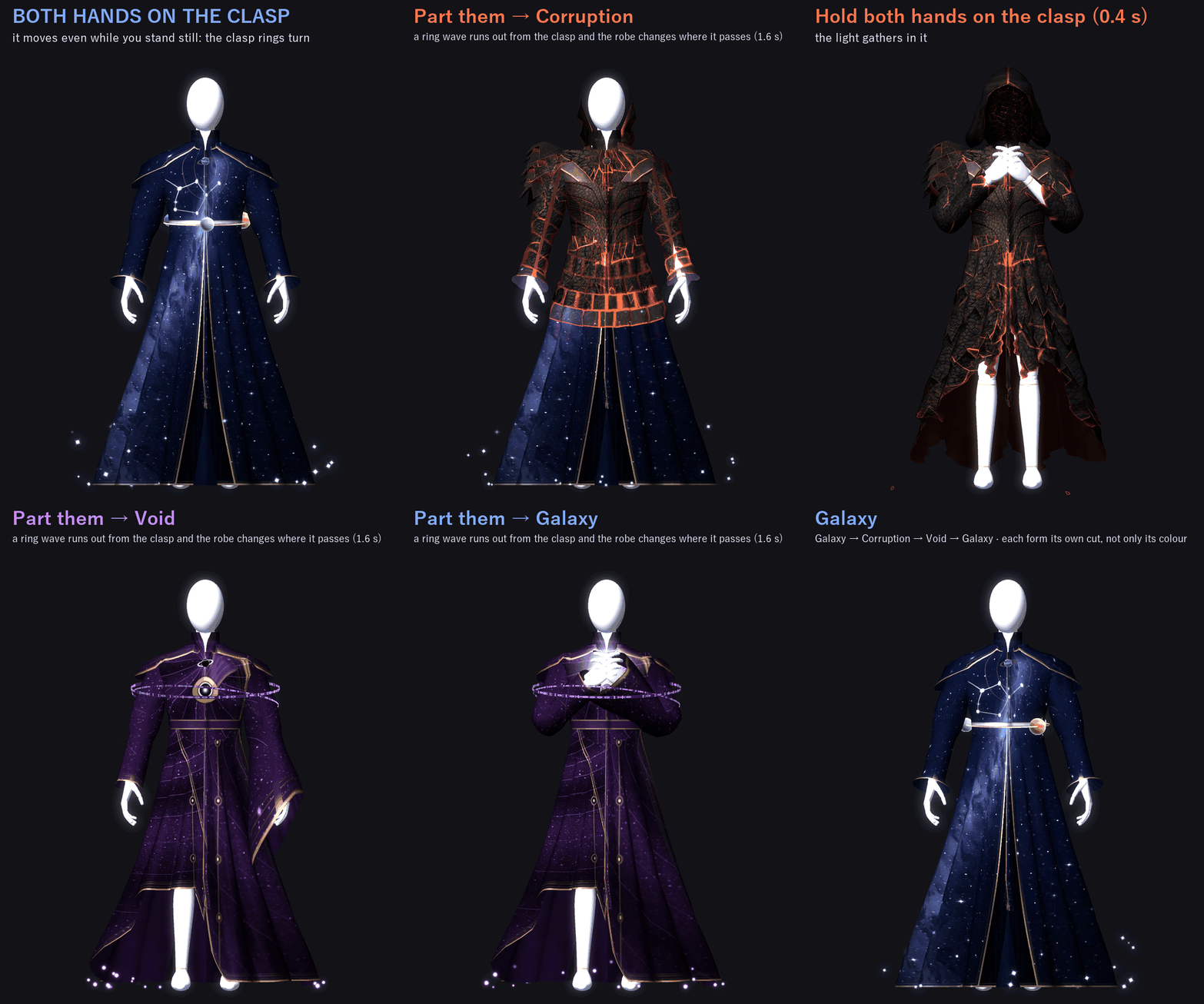
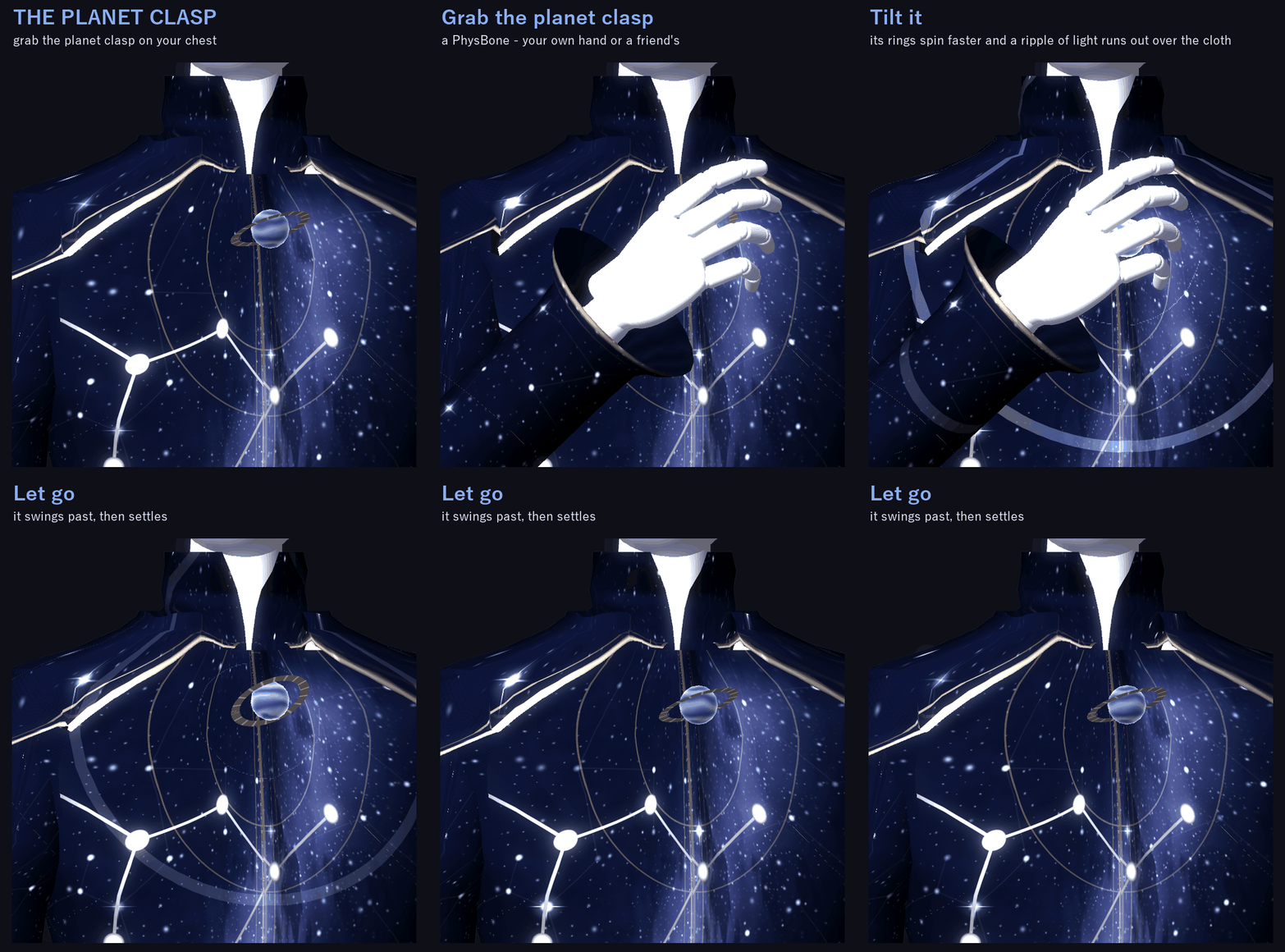
A long hooded robe with a small planet clasp on the chest. Hold both hands on the clasp, part them, and a ring wave runs out from it and turns the robe into the next form: Galaxy, Corruption, Void. Each form has its own cut and shape, not only its own colour.
It moves even while you stand still: the clasp rings turn, and each form has its own idle motion (stars twinkle and planets orbit / red cracks breathe light / folds slowly wind in).
FITTED TO YOUR AVATAR
The robe is made for your avatar when you upload (or when you press "Fit to this avatar"). It measures your avatar's body, the clothes it already wears and the volume of the hair, and follows the bust, waist and hips. Animal ears, round or pointed, get their own pockets in the hood, and a tail passes out through the back.
You don't need to take off your avatar's own clothes (it measures them), but a very bulky outfit can make the robe stand off the body.
Fit-tested in Unity on 9 body types: the VRChat SDK sample avatar and 8 test bodies I built for this (1.30 to 1.85 m tall; A-pose and T-pose; cat, fox, bear and rabbit ears; thin, fluffy and puff tails; long hair; a large bust; a male build; one wearing a separate outfit merged with Modular Avatar Merge Armature).
ONE THING YOU DO WITH YOUR BODY
Hold both hands on the chest clasp for 0.4 s (the light gathers in it), then part them: a ring wave runs out from the clasp and the robe changes where the wave passes (1.6 s). Galaxy → Corruption → Void → Galaxy. It never switches in one frame. You can turn this off in the menu (Gesture change).
ONE THING YOU DO WITH YOUR HAND
Grab the planet clasp on your chest and tilt it: its rings spin faster and a ripple of light runs out over the cloth. Let go and it swings past, then settles.
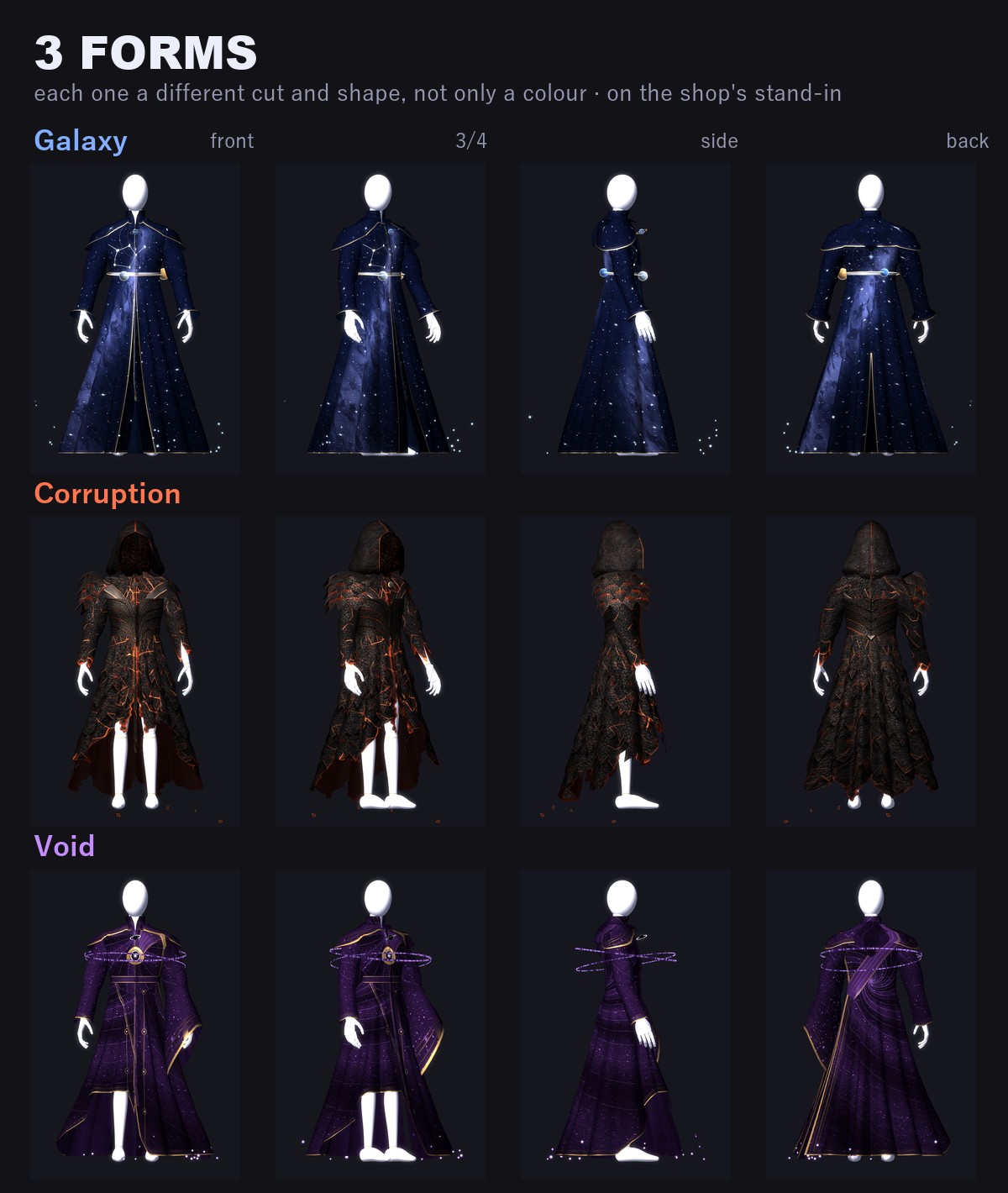
3 FORMS (each one a different shape, not only a colour)
• Galaxy (order): night-sky cloth (the sky is drawn from the angle you look at it), star-chart panel lines and metal orbit lines. Stars twinkle, five small planets orbit above the hem, a star-chart disc turns on the back, and a rimless star chart turns inside the hood.
• Corruption (broken): burnt black cloth like stone, with red cracks that breathe light. The hem is torn into long strips, at the knee in front and down to the floor behind. A five-bladed pauldron on the right shoulder, a torn left sleeve, a corset of V-shaped plates, and shards falling from the hem.
• Void (pulled in): the panel lines and folds wind in toward the clasp and toward a point on the back, slowly turning, and specks of light sink in. A sash runs diagonally across the back and a wrap across the front; on the chest sits an orb of dark glass with a violet core. Inside the hood, a violet whirl.
IT FORMS OUT OF THE CLASP
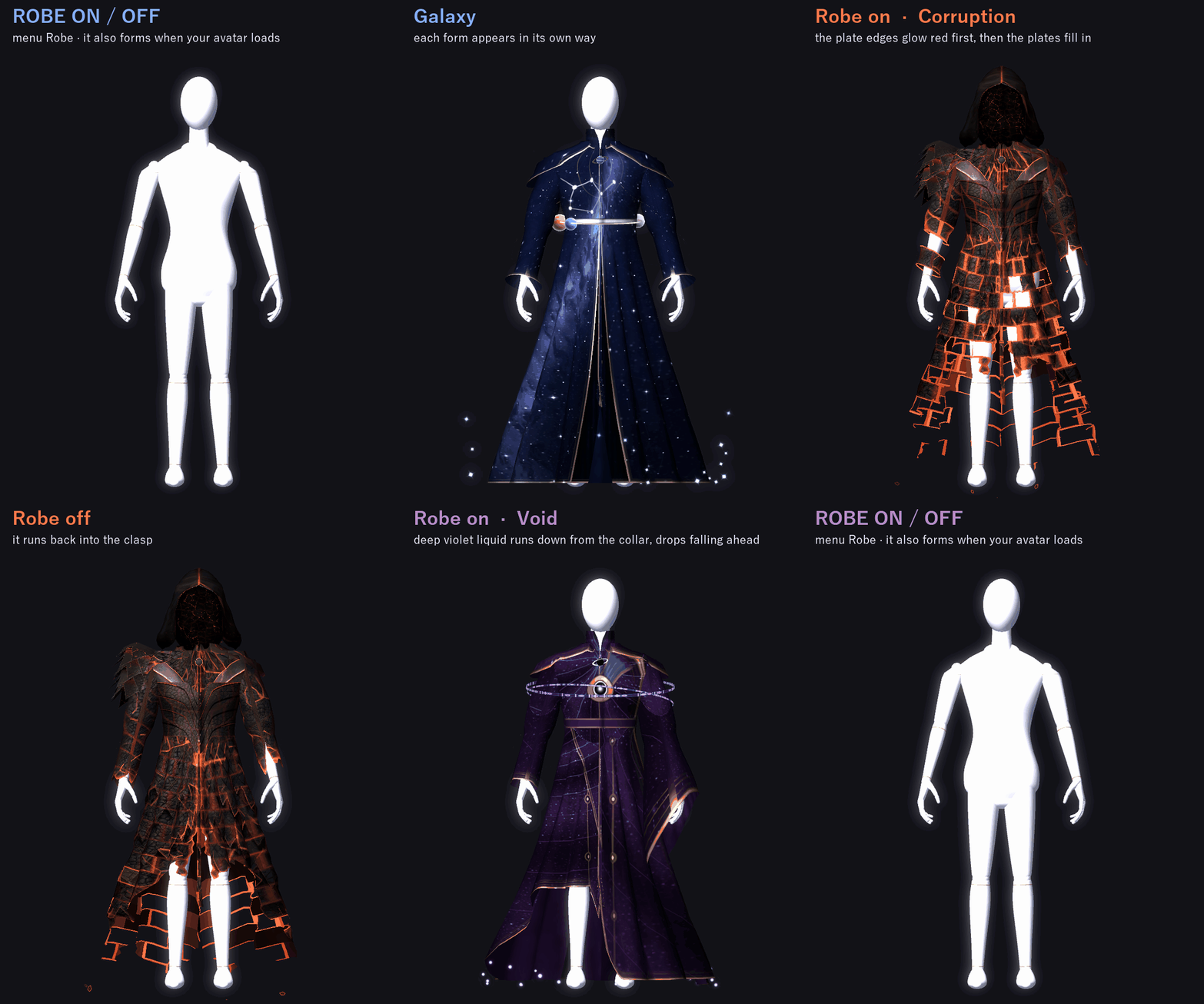
When your avatar loads (after 0.5 s) or you turn Robe on, the robe forms out of the clasp over 2.2 s, in a different way for each form. Galaxy: a net of light threads runs ahead and weaves in. Corruption: the plate edges glow red first, then the plates fill in. Void: deep violet liquid runs down from the collar, with drops falling ahead. Turn Robe off and it runs back into the clasp.
HOOD AND FACE
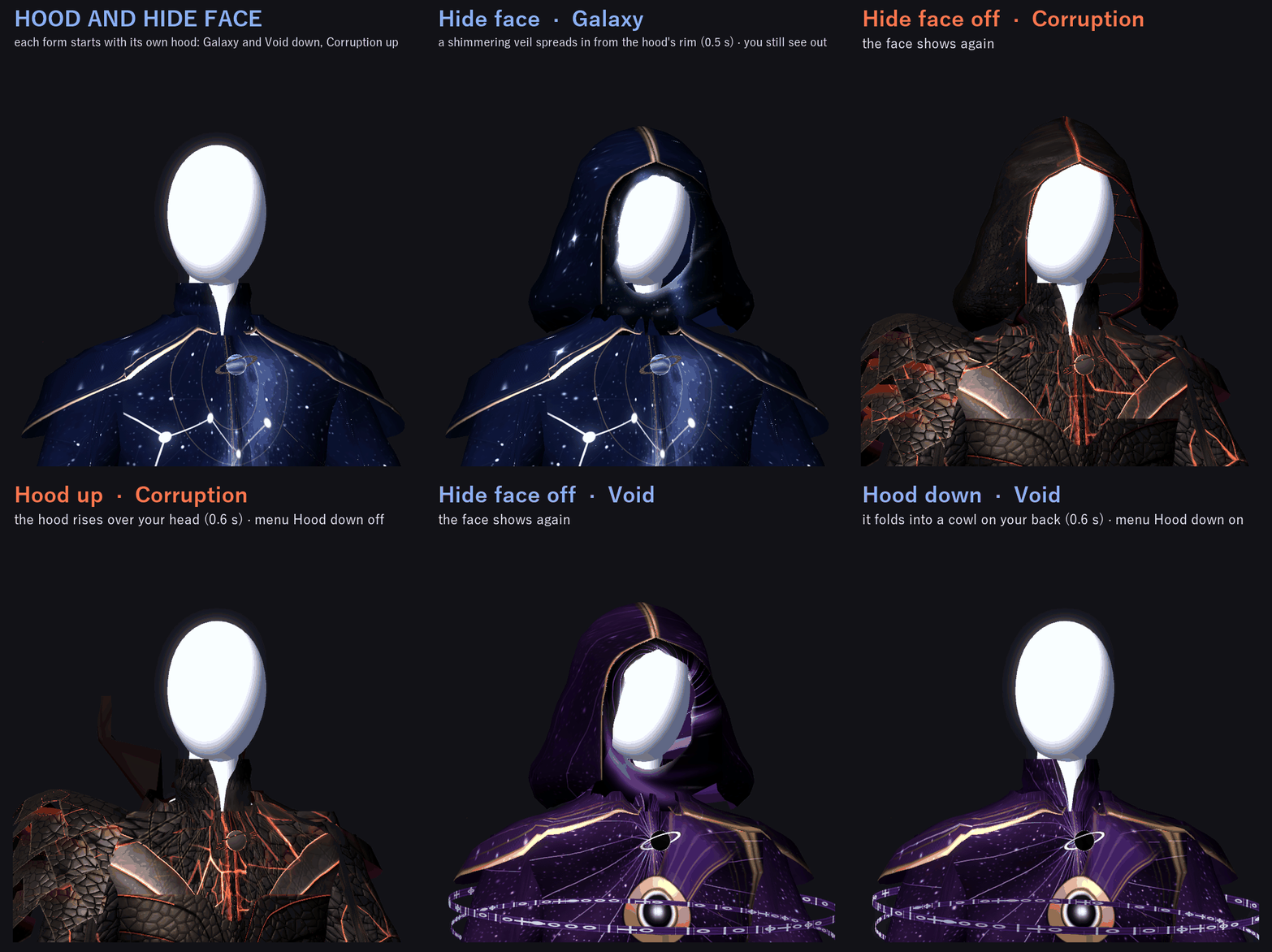
• The hood goes up or down in 0.6 s. Lowered, it lies on your back as a folded cowl. Each form starts with its own: Galaxy and Void down, Corruption up. The menu toggle switches it.
• Hide face: with the hood up, a rippling veil spreads in from the rim and fills the face opening (0.5 s). You still see out: the veil sits on the head bone, which VRChat hides in your own first-person view.
SITTING
At fit time the robe also gets two corrective shapes that lay the skirt over the thighs and knees. Knee contacts turn them on when you sit, squat or kneel. In my fit test on the 9 body types, the amount of leg poking through the skirt went down against the robe without these shapes: sitting −85%, squatting −64%, kneeling −40%, a high step −44%. It is not zero: see GOOD TO KNOW.
MENU ("Cosmic Robe")
• Robe: on / off. Off runs the robe back into the clasp (on to start, remembered)
• Galaxy / Corruption / Void (remembered)
• Hood down: switches the hood from that form's own setting (remembered)
• Hide face (on to start, remembered)
• Gesture change: the two-hands change on / off (on to start, remembered)
• Effects: effects such as the falling shards on / off (on to start, remembered)
TWO PREFABS: FULL AND LITE
• CosmicRobe (Full): the Corruption shards break when they hit the ground (particle collision).
• CosmicRobe_Lite: the shards fade in the air, no collision.
VRChat PC performance rank of the robe by itself (VRChat SDK check): Full Medium, Lite Good.
In VRChat you see the rank of your avatar and the robe together (on the SDK sample avatar, which is Medium by itself, both stay Medium). Turning Effects off does not change the rank (VRChat counts parts that are turned off too).
EASY TO PUT ON
1. Add Modular Avatar to your avatar project (VCC).
2. Import CR_1.0.0.unitypackage.
3. Drag CosmicRobe (or CosmicRobe_Lite) onto your avatar in the Hierarchy.
4. Upload. The robe is fitted at upload, and Modular Avatar adds the "Cosmic Robe" menu, the parameters and the animator layers.
To see it before you upload, select the robe and press "Fit to this avatar" in the Inspector.
WHAT'S INCLUDED
• CR_1.0.0.unitypackage: 2 prefabs (CosmicRobe, CosmicRobe_Lite), the fitting scripts, shaders, 3 materials (the robe + 2 for the shards), menu and animator
Folder: Assets/Caligo/CosmicRobe/ (the two prefabs at the top; Animations, FX, Materials, Shaders and Scripts inside; both prefabs use the same files)
• README (English and Japanese)
SPECS (the robe mesh is made for each avatar; these are the numbers on the VRChat SDK sample avatar)
• Tris: 16,994 / Vertices: 9,572
• Skinned meshes: 1 / Material slots on the robe: 1 / Robe bones: 31 / Blendshapes: 3 (hood down, sitting left, sitting right)
• Particle systems: Full 2 (max 108 particles), Lite 1 (max 48) / Lights: none / Trail renderers: none
• PhysBones: 1 (the clasp) / Contacts: 6 (2 for the hands, 4 for the knees) / Constraints: 19
• Synced parameters: 14 bits
REQUIREMENTS
• VRChat SDK (Avatars)
• Modular Avatar (available through VCC)
TESTED WITH
Unity 2022.3.22f1 / VRChat SDK 3.10.5 / Modular Avatar 1.18.7. The fit, the parts, the parameters, the menu and the animator steps are checked in Unity. The package imports into a clean project with no problems (2 prefabs).
PC only (custom shader, no Quest version).
GOOD TO KNOW
• It is for humanoid avatars.
• Limits I found in the fit test: in a deep squat, kneeling or a high step the knees may still show a little; long hair may sink a little under the capelet or the lowered hood; ears or a tail swung far may pass a little through the cloth; on an avatar with a very different build, some parts may stand slightly off the body.
• People who block custom shaders in their Safety settings won't see it.
SUPPORT
If the two-hands change, the clasp, sitting, the forming effect or anything else doesn't work as described in VRChat, message me on Jinxxy. I'll fix it and send you the update for free.
AI DISCLOSURE (AI-Assisted)
The shader, the code that builds and fits this robe and the text on this page were written with help from an AI assistant. An AI image generator made rough concept sketches I looked at while designing (the shape follows a few of them); nothing it made is in the files or in the preview images, which are rendered in Unity from the actual robe.
TERMS
• OK to use on your avatar in VRChat and other platforms
• OK to stream, record, and post on social media
• Editing is fine
• Please don't redistribute or resell the files, edited or not
UPDATES
• v1.0.0 (2026-11-10): first release