
Constant Brush Size Tool for Blender
Product Description
Tired of your brush size changing as you zoom in and out?
The Constant Brush Size Tool keeps your brush size consistent relative to your mesh in Texture, Vertex, and Weight Paint modes, giving you a smooth and predictable painting experience regardless of viewport zoom.
Features:
- Consistent brush scaling: brush size stays uniform regardless of zoom level.
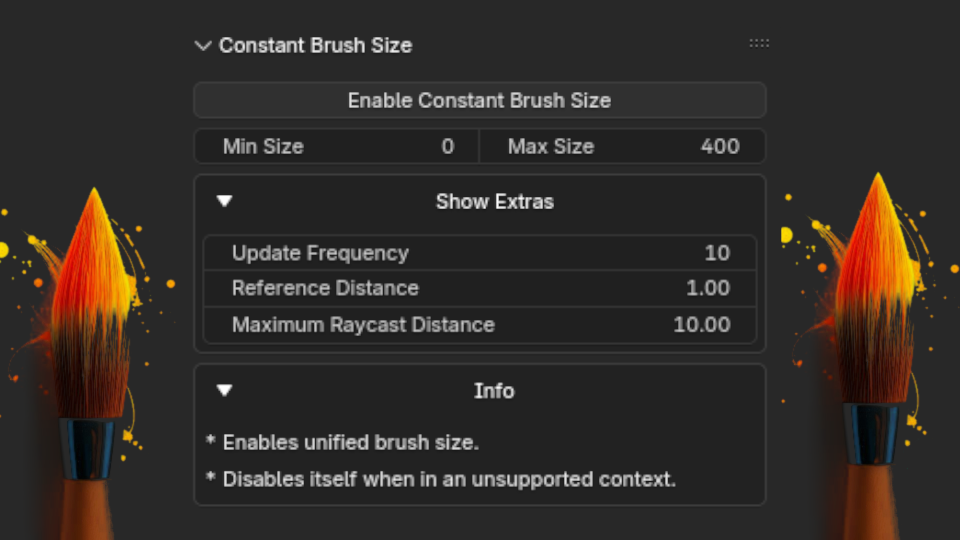
- Adjustable parameters: configure minimum/maximum brush size, update frequency, and reference distance.
- Automatic context handling: works correctly in both orthographic and perspective views.
- Simple UI integration: enable or disable the tool from a single button in the View3D > N panel.
Compatibility:
Supports Blender 4.2 through 5.0 and later. Last tested on Blender 5.1.1.
Please note that this tool aims to keep brush size as consistent as possible across zoom levels, but results can vary slightly depending on view angle, mesh scale, and your configured settings. The minimum/maximum size and reference distance parameters can be adjusted to fine-tune behavior for your specific workflow.
Installation:
- Download the addon .zip file.
- Open Blender and go to Edit > Preferences.
- Click on the Add-ons tab.
- Click Install... at the top.
- Locate the downloaded .zip file and select it.
- Click Install Add-on.
- Enable the addon by checking the box next to its name.